Best Router Table Accessories for Safer, More Accurate Routing
What's inside
- Choose accessories by the problem they solve
- Best router table accessories by situation
- Featherboards: the first control upgrade
- Router lifts: accuracy versus cost
- Insert rings: match the opening to the cutter
- Dust collection: capture above and below the table
- Safety switches: inexpensive and essential
- Measuring aids that improve repeatability
- What wears out first
- A sensible buying order
- Related Guides
- Choose accessories by the problem they solve
- Best router table accessories by situation
- Featherboards: the first control upgrade
- Router lifts: accuracy versus cost
- Insert rings: match the opening to the cutter
- Dust collection: capture above and below the table
- Safety switches: inexpensive and essential
- Measuring aids that improve repeatability
- What wears out first
- A sensible buying order
- Related Guides
As an Amazon Associate I earn from qualifying purchases. This post may contain affiliate links at no extra cost to you.
The best router table accessories are the ones that control the workpiece, improve bit-height accuracy, contain chips, and let you shut the router off without reaching under the table; for most users, a featherboard, dust collection hood, large safety switch, and reliable measuring aid should come before premium upgrades such as a router lift.
As an Amazon Associate we earn from qualifying purchases at no extra cost to you.


Contents
- Choose accessories by the problem they solve
- Best router table accessories by situation
- Featherboards: the first control upgrade
- Router lifts: accuracy versus cost
- Insert rings: match the opening to the cutter
- Dust collection: capture above and below the table
- Safety switches: inexpensive and essential
- Measuring aids that improve repeatability
- What wears out first
- A sensible buying order
- Related Guides
Choose accessories by the problem they solve
Router table accessories are easier to compare when grouped by function rather than by brand. Start with accessories that reduce contact with the cutter or make an error less likely. Then add convenience upgrades that save setup time.
| Accessory | Primary job | Useful specifications to look for | Typical market range | Best for |
|---|---|---|---|---|
| Featherboard | Maintains steady pressure against the fence or table | 3/4-inch miter-slot fit, replaceable fingers, 1/2 to 1-1/2 inches of adjustment | $20-$80 | New users, narrow stock, repeated cuts |
| Router lift | Adjusts bit height from above the table | 1/16-inch or finer adjustment, compatible collet size, 3-1/2-inch or larger plate opening | $150-$400 | Frequent users and precise profiles |
| Insert rings | Supports stock close to the bit and improves chip control | 1-1/4 to 3-1/2-inch openings, flush fit, multiple ring sizes | $15-$60 per set | Small workpieces and large cutters |
| Dust collection | Captures chips above and below the table | 2-1/2-inch port, 4-inch cabinet port, 500-800 CFM collector target | $30-$180 | Indoor shops and frequent routing |
| Safety switch | Provides quick, hands-free power shutoff | 15-amp rating, magnetic or no-volt release, 6-10-foot cord | $30-$100 | Every router table, especially shared shops |
| Measuring aid | Sets height, fence position, and repeatable offsets | 0.001-inch-resolution indicator or 1/64-inch rule; magnetic or base-mounted support | $15-$120 | Joinery, matching profiles, batch work |
Best router table accessories by situation
| Your situation | Prioritize | Why |
|---|---|---|
| Under $100 or occasional use | Safety switch, one featherboard, basic dust hood | These improve control and cleanup without requiring a dedicated lift-compatible table. |
| Beginner using a fixed-base router | Featherboards, insert-ring set, height gauge | They make pressure, opening size, and bit height easier to manage. |
| Small shop with limited storage | Compact featherboard, combination dust hood, removable measuring aid | These provide useful control without permanently enlarging the table. |
| Weekly or professional use | Router lift, dual dust collection, replaceable featherboard fingers | Faster adjustments and cleaner operation repay their higher initial cost. |
| Large panels or long boards | Two featherboards, tall fence, outfeed support | One pressure point rarely keeps a long workpiece stable throughout the cut. |
Featherboards: the first control upgrade
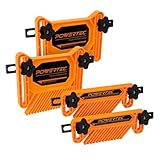
A featherboard presses the workpiece against the fence or table while allowing it to move in the feed direction. This reduces wandering, uneven bearing contact, and sudden changes in cut depth. It does not replace safe hand positioning: keep hands away from the bit and use push blocks when the work becomes narrow.
One featherboard or two?
Use one fence-mounted featherboard when the main problem is a board drifting away from the fence. Add a table-mounted featherboard when the stock also tends to lift. For long stock, two fence-mounted units spaced several inches apart provide more consistent pressure than one heavily tightened unit.
Look for a model with a 3/4-inch miter-slot bar if your table uses a standard slot. Adjustable fingers are preferable to rigid combs because they can be tuned for different thicknesses. Do not overtighten them: excessive pressure increases feed effort and can make the workpiece burn.
Router lifts: accuracy versus cost
A router lift replaces repeated loosening and retightening of the router’s base with an above-table height mechanism. The useful benefit is not simply convenience. A fine adjustment makes it practical to raise a bit by a fraction of a millimeter, take a test cut, and repeat the adjustment without disturbing the fence.
Before buying, check the router motor’s diameter and mounting compatibility. Common lift systems accept motors around 3-1/4 inches in diameter, but this is not universal. Also verify whether the lift includes a 1/2-inch collet, a 1/4-inch collet, or both. A lift that fits the motor but cannot accommodate your bit shanks is an expensive mismatch.
A lift makes the most sense when you change bit height frequently, use bearing-guided profiles, or make matching cuts. For occasional edge routing, a fixed-base router with a stable height gauge can deliver most of the practical accuracy at a lower cost.
Insert rings: match the opening to the cutter
Insert rings, sometimes called reducing rings, close the unused space around the bit. The smallest safe opening should leave clearance for every rotating part of the cutter, including its widest cutting diameter. A smaller opening gives the workpiece more support and reduces the chance of a thin edge dropping into the plate opening.
For example, if a cutter’s maximum diameter is 1-1/4 inches and you allow 1/8 inch of radial clearance, the opening needs to be at least:
1-1/4 inches + (2 × 1/8 inch) = 1-1/2 inches.
Use the manufacturer’s clearance guidance where available. Never use an insert ring that touches the bit, and check that the ring sits perfectly flush. A ring that rocks or stands proud can affect the workpiece and may indicate damaged threads, sawdust beneath the ring, or an incompatible plate system.
Dust collection: capture above and below the table
A router table can eject chips in two directions. A cabinet port alone may miss chips thrown above the table, while a fence port alone may leave the enclosure full of dust. The most effective arrangement combines a fence or bit-guard port with a cabinet port.
A 2-1/2-inch hose is convenient for a compact shop vacuum, but a 4-inch port generally moves more air when connected to a true dust collector. Do not judge performance by port diameter alone: a long, corrugated hose, sharp bends, clogged filters, and a full collection bag can reduce airflow substantially.
For a simple setup, calculate the cost per use before upgrading. A $120 dust hood used 60 times costs $2 per session during its first year. If it reduces cleanup by 10 minutes per session, it saves 10 hours over that year, before accounting for filter and bag costs. The value is higher in an enclosed shop or when several people use the router table.
Safety switches: inexpensive and essential
A large paddle-style safety switch should be reachable with a knee or hand while you maintain control of the workpiece. Choose a switch rated for the router’s voltage and amperage, with a no-volt release or equivalent feature so the router does not restart automatically after power is interrupted.
Position the switch where it cannot be hit accidentally during normal feeding, but do not hide it behind the table. Secure the cord so it cannot contact the bit, interfere with the fence, or become a trip hazard. A switch is not a substitute for unplugging the router before changing bits or servicing the table.
Measuring aids that improve repeatability
A ruler is enough for rough fence positioning, but a height gauge or dial indicator is more useful when a profile must match an existing piece. A 0.001-inch-resolution indicator can show small changes that are difficult to see against a ruler, although the actual cutting result also depends on bit sharpness, stock thickness, and feed direction.
For repeat work, record three measurements:
- Bit height from the table surface.
- Fence position from the bit’s cutting edge.
- Distance from the workpiece reference edge to the intended profile.
Make a test cut in scrap from the same material before routing the final part. This catches the most common measuring mistake: referencing the fence from the bit’s shank or center instead of from the actual cutting edge.
What wears out first
- Featherboard fingers: They can split, lose flexibility, or become polished and slippery. Replaceable fingers are cheaper to maintain than replacing the entire unit.
- Insert rings: Plastic rings may chip around the opening, while aluminum rings can develop burrs if struck by a cutter. Keep a spare set in common diameters.
- Dust hoses and seals: Cracks and loose joints reduce airflow before the collector itself fails. Inspect connections whenever suction seems weaker.
- Lift threads and bearings: Fine-adjustment mechanisms collect resin and dust. Brush them clean and use only the lubricant specified by the lift manufacturer.
- Switch cords: Repeated bending near the switch can damage insulation. Replace damaged cords rather than taping over cuts.
A sensible buying order
For a first setup, buy a safety switch and one quality featherboard before a lift. Add a dust hood if the table is used indoors, then purchase insert rings that match the cutters you actually own. Choose a router lift after confirming motor compatibility and deciding whether frequent above-table adjustments justify its cost. Finally, add a height gauge or dial indicator when your work involves matching profiles, repeated parts, or joinery.
This order puts control and shutdown access ahead of convenience. The result is a router table that is safer to operate, easier to clean, and more repeatable without paying for accessories that do not match your table, router, or working habits.