
Key takeaways
- Compare the best measuring and marking tools for accurate woodworking, from digital calipers and angle gauges to laser measures and moisture meters.
What's inside
As an Amazon Associate I earn from qualifying purchases. This post may contain affiliate links at no extra cost to you.
- Top Pick: Wixey WR365 Digital Angle Gauge
- Runner-up: Specs
- Also consider: Specs
Accurate woodworking is rarely about one heroic measurement. It is about a chain of small checks that agree with each other, from confirming that lumber is dry enough to build with, through setting a blade angle, squaring a layout line, and verifying that a tenon matches its mortise. When one link is weak, the error appears later as a gap, a twist or a part that needs remaking.
The five tools in this guide cover the main links in that chain. A digital angle gauge handles machine setup, a laser measure handles distance, a combination square handles layout and squareness, a digital caliper handles fine joinery dimensions, and a pinless moisture meter handles the lumber itself. Together they replace guesswork with repeatable numbers at every stage of a project.
As an Amazon Associate, we earn from qualifying purchases.
Contents
How to choose
Start by matching the tool to the error you make most often. If joints suffer because a saw blade is slightly off, an angle gauge deserves priority. If layout lines drift or assemblies come out of square, a good combination square is the foundation. If parts almost fit but need forcing, a caliper will reveal where the difference lies. If finished work moves later, moisture checking is the missing step, and a laser measure earns its place when you measure rooms, sheet goods or shop layouts alone.
Next, think about range and resolution together. A caliper that reads to a thousandth is valuable for joinery but useless for an eight foot board, while a laser measure that reaches across a room cannot judge a tenon. Good shops own measuring tools in layers rather than searching for one device that does everything, and the picks below were chosen because each layer is strong without overlapping wastefully.
Readability and build also count. Fraction displays help in imperial workshops, backlit screens help in dim corners, and flip displays help when a gauge sits at an awkward angle. Stainless bodies resist wear, magnetic bases stay put on cast iron, and dust protection extends the life of electronics in a sawdust filled room.
Wixey WR365 Digital Angle Gauge

The Wixey WR365 is the machine setup specialist in this group. It measures angles across a range of plus or minus 180 degrees, so it can check a table saw blade at vertical, a bevel setting, a mitre saw angle or a jointer fence. Setting a blade by eye against a small square is slow and uncertain, while a digital reading gives an immediate number that can be repeated next time.
Its flip display is a thoughtful detail, because the gauge often ends up viewed from below or upside down depending on the machine, and the display keeps the number readable instead of forcing the user to lean into the blade area. The magnetic base attaches to a blade or fence and stays there during adjustments, leaving both hands free, and the built-in level readout lets it double as a quick level for machine tops.
Specs
| Spec | Detail |
|---|---|
| Product | Wixey WR365 Digital Angle Gauge |
| Measuring range | Plus or minus 180 degrees |
| Display | Flip display |
| Base | Magnetic base |
| Level function | Built-in level readout |
| Typical uses | Blade, fence and mitre angle setup |

Choose the Wixey if angled work, frames, bevelled boxes or segmented pieces are regular output, or if you share machines and need to return to known settings reliably. It will not replace a square for layout, but for proving that a machine is set where you think it is, it is the most direct tool in this guide.
Bosch BLAZE GLM165-40 Laser Measure
The Bosch BLAZE GLM165-40 covers the long distance end of shop measuring. With a range of up to 165 ft, it handles room dimensions, workshop layouts and cabinet runs that would otherwise need a tape, a helper and a second attempt when the tape sags. A single user can stand in one place and take repeated readings quickly, which helps when measuring alone.
Beyond simple length, the area and volume modes save arithmetic on common jobs such as floor area for built-ins or wall area for panelling. The colour backlit display keeps numbers readable in basements and garages where lighting is poor, and the measurement memory helps when several dimensions must be carried back to the bench. In the workshop it also suits checking diagonals on large assemblies and confirming a finished piece will fit its space.
Specs
| Spec | Detail |
|---|---|
| Product | Bosch BLAZE GLM165-40 Laser Measure |
| Range | Up to 165 ft |
| Modes | Length, area and volume |
| Display | Colour backlit display |
| Memory | Stores recent measurements |
| Typical uses | Rooms, shop layout and long stock |
Choose the Bosch if you fit cabinets, build site made furniture or regularly measure rooms alone. If your work never leaves a small bench, a tape and caliper may be enough. For everyone else, laser speed and consistency quickly become part of the routine.
IRWIN Combination Square 12 Inch

The IRWIN combination square is the traditional layout anchor in this group, and no digital tool replaces what it does. Its 12 inch stainless steel blade provides a straight, durable rule for marking lines, checking edges and transferring measurements, while the sliding head gives a 90 degree face for square marking and a 45 degree face for mitres and chamfers. It is the tool that confirms an edge is square before joinery is laid out on it.
Etched graduations are a practical advantage over printed markings, because etched lines do not rub away with shop wear, and stainless construction resists rust that can stain light coloured wood. Locked at a setting, the sliding head also works as a marking gauge for repeated lines parallel to an edge, and the blade end serves as a depth gauge for mortises and grooves. It can even check saw blade or router bit height against the table.
Specs
| Spec | Detail |
|---|---|
| Product | IRWIN Combination Square, 12 Inch |
| Blade | 12 inch stainless steel |
| Marking angles | 90 degrees and 45 degrees |
| Graduations | Etched graduations |
| Head | Sliding head, doubles as a depth gauge |
| Typical uses | Layout, squareness and depth checks |
Choose the IRWIN if you want one dependable square for marking, checking and transferring dimensions on furniture sized work. Larger squares suit sheet goods breakdown, but for bench joinery the 12 inch combination format remains the most versatile size, and this stainless, etched version is built to stay accurate and legible.
iGaging EZ-Cal 6 Inch Digital Caliper
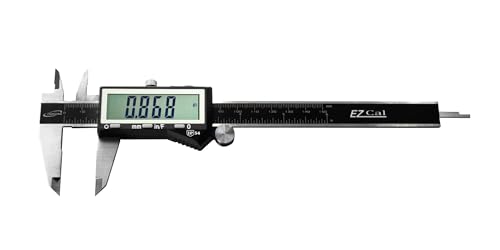
The iGaging EZ-Cal handles the fine end of the measuring chain, where small differences decide whether a joint slips together or needs force. Its 0 to 6 inch range covers board thickness, tenons, mortises, dowels, grooves and hardware, and its accuracy within 0.001 in is well matched to furniture tolerances. When two parts disagree, the caliper shows exactly which one moved and by how much.
The display switches between inches, metric and fractions, which is unusually helpful because plans, router bits and lumber often use fractions while accessories may be metric. Converting in your head invites errors, while switching on the tool keeps everything in agreement. The hardened stainless body and IP54 rating suit an active shop better than lightweight plastic calipers, and the included storage case protects the jaws and display between uses.
Specs
| Spec | Detail |
|---|---|
| Product | iGaging IP54 Electronic Digital Caliper, EZ-Cal |
| Measuring range | 0 to 6 inches |
| Accuracy | Within 0.001 in |
| Display units | Inches, metric and fractions |
| Body | Hardened stainless steel |
| Extras | IP54 rating, storage case included |
Choose the EZ-Cal if joinery fit, stock preparation and hardware matching are central to your work. It will not measure a tabletop length or a room, but within its range it is the most precise and revealing instrument in this guide. Most users find that once a caliper lives on the bench, it gets used on every project.
Wagner Meters Orion 950 Pinless Moisture Meter
The Wagner Orion 950 checks the material itself, because even perfect layout cannot save a project built from lumber that is still moving. Its pinless sensor reads moisture without driving pins into the board, so it leaves no holes in show faces, figured stock or wide panels. Scanning along a board is quick, which encourages checking several places instead of trusting one reading.
Two reading depths, a quarter inch and three quarters of an inch, help separate surface dryness from a wetter core, which matters after resawing or in thick stock. The meter covers a moisture range of 4.0 to 32.0, calculates equilibrium moisture content automatically and shows the dew point, so a reading can be judged against the environment. Bluetooth logging, an included on-demand calibrator and a seven-year warranty complete a premium package.
Specs
| Spec | Detail |
|---|---|
| Product | Wagner Meters Orion 950 Pinless Moisture Meter |
| Sensor | Pinless, non-damaging |
| Reading depths | 1/4 inch or 3/4 inch |
| Moisture range | 4.0 to 32.0 |
| Calculated values | Equilibrium moisture content and dew point |
| Extras | Bluetooth app, calibrator, seven-year warranty |
Choose the Orion 950 if you buy rough lumber, dry your own boards, resaw thick stock or build furniture where seasonal movement has caused problems before. Occasional users building only from stable, pre-surfaced material may not need its depth of information, but for anyone who has watched a panel cup after assembly, it addresses the cause rather than the symptom.
Buying guide
Buy in the order that matches your current frustrations. For many shops the combination square comes first, because layout and squareness affect every project. The caliper usually follows, since it improves joinery fit immediately. The angle gauge is next when machine setup becomes the limiting factor, and the moisture meter becomes essential once you handle rough, thick or home dried lumber. The laser measure can be added whenever room work, installations or solo measuring become frequent.
Avoid duplicates in the same layer. Two calipers of the same size add little, while a caliper plus a square plus an angle gauge cover far more ground. Spend instead on complementary ranges, such as pairing the 6 inch caliper with the 165 ft laser measure.
Look after accuracy with simple habits: keep caliper jaws clean and cased, check a square against a known straight edge, verify a moisture meter with its calibrator, and recheck machine angles after blade changes. Record the numbers that matter, such as stack moisture readings or the thickness that made a drawer slide well, and those records will make the next build faster.
FAQ
Which measuring tool should a woodworker buy first?
A combination square is the usual first purchase because it handles layout, squareness and depth checks on almost every project. A digital caliper is the most common second tool, adding precise thickness and joinery measurements that a square cannot provide.
Do I need both a caliper and a laser measure?
Yes, if your work spans joinery and rooms. A caliper measures small dimensions such as thickness and grooves within its 6 inch range, while a laser measure handles long distances, area and volume. Neither tool does the other job well.
Why check moisture if lumber looks and feels dry?
Surface dryness can hide a wetter core, especially in thick stock. A pinless meter with two reading depths compares surface and deeper moisture without damaging the board, and an EMC calculation shows whether the wood has settled into balance with the shop.
How does an angle gauge improve machine cuts?
It replaces estimation with a number. A magnetic gauge on a blade or fence shows the actual angle as you adjust, so bevels and mitres can be set and repeated accurately.
Final verdict
These five tools succeed because each one owns a distinct job: the IRWIN square lays out and checks, the iGaging caliper proves fine dimensions, the Wixey gauge sets machines, the Bosch covers distance, and the Wagner judges the lumber itself. A shop equipped across all five layers measures by evidence, and that shows in joints that close and pieces that remain stable.
Related guides
More from Amazon
Programs that pair well with the guide above. Offers and eligibility are set by Amazon and may change.
A free business account with business pricing and bulk-buying tools for work, shop or home office.
Create a business accountFree shipping on eligible items, Prime Video and more. Eligible new members can start with a free trial.
Start a Prime free trialAudiobooks and podcasts to listen to on the go. Eligible new members can start with a free trial.
Try Audible freeAd-free music streaming. Eligible new subscribers can start with a free trial.
Try Music Unlimited freeAs an Amazon Associate we earn from qualifying purchases.


Write Your Review
No reviews yet. Be the first to share your experience!