How to Set Band Saw Blade Tracking After Replacement
What's inside
As an Amazon Associate I earn from qualifying purchases. This post may contain affiliate links at no extra cost to you.
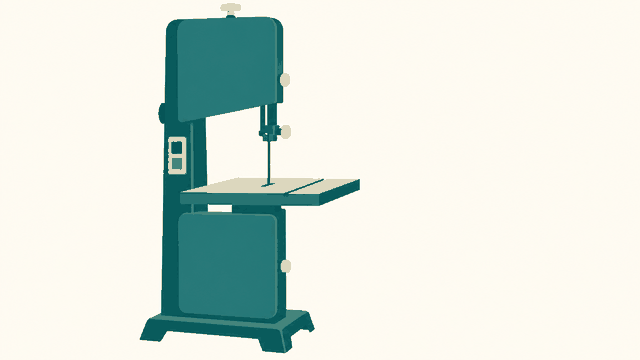
After fitting a new band saw blade, set its tracking before you make a cut. Tracking is the blade’s position on the crowned wheel tires; it is not the same as adjusting the guides. A blade that rides too far forward or backward can rub the frame, come off the wheel, or cut poorly. The exact target depends on the saw and blade width, so check the manual first. If it gives no clear target, use the procedure below as a starting point.
Contents
Before you adjust tracking
Unplug the saw. Open the wheel covers and check that the blade is installed with its teeth pointing in the direction of travel. Make sure it is seated in the guides without being pinched, and that the upper guides are backed away from the blade. Clear sawdust from the tires; debris can shift the blade and make tracking look inconsistent.
Set blade tension according to the saw maker’s instructions. Tracking changes as tension changes, so setting it with a slack blade and then tightening the blade can undo your work. If your saw has a tension scale, treat it as a starting point rather than a precision gauge: scales can be inaccurate, and the correct setting varies with blade width and construction. Do not run the saw with a loose blade to avoid tensioning it.
Wear eye protection and keep your hands away from the wheels and blade. You will need to close the covers before powering the saw for a tracking check. Never reach into the machine while it is running.
Set the blade position on the wheel
With the saw unplugged, turn a wheel by hand for several full revolutions and watch where the blade settles on the tires. On many saws, the blade tracks near the center of the upper wheel’s crown. Some manufacturers specify that the blade’s gullets—the spaces between the teeth—should sit near the wheel center instead. Follow the manual’s reference point, especially for wide blades.
Make small adjustments with the tracking knob, usually located behind or above the upper wheel. Turn the wheel by hand after each adjustment so you can see the result across a full revolution. If the blade walks toward the front or back edge, use the tracking knob to steer it toward the specified position. The direction a knob moves the blade varies by saw, so don’t rely on a universal “turn clockwise” rule.
Do not force the blade against a tire edge. If it will not stay in position, stop and check blade tension, wheel alignment, tire condition, and whether the blade is twisted or damaged. A crowned tire helps the blade self-center, but it cannot compensate for a worn tire or a bent wheel.
Confirm tracking under power
Once the blade stays in the intended position during hand rotation, close the wheel covers and plug in the saw. Stand clear of the blade’s path, start the saw briefly, and watch through the viewing window if the machine has one. Otherwise, switch off and unplug the saw before opening the covers to inspect. If the blade shifts during the powered check, make another small tracking adjustment with the saw unplugged, then repeat the check with the covers closed.
After tracking is stable, set the thrust and side guides according to the manual. Guides should support the blade near the work without pressing on it during an unloaded test. Tracking is not a substitute for correct guide adjustment: a blade can sit properly on the wheel and still wander in a cut if the guides are too far away, too tight, or misaligned.
Common tracking problems
| Symptom | Likely checks | What to do |
|---|---|---|
| Blade drifts toward a tire edge | Tension, tracking setting, debris, damaged blade | Unplug, clean the tires, restore the specified tension, and adjust tracking in small steps. |
| Blade position changes as the wheel turns | Uneven tire, bent wheel, blade weld or kink | Inspect the blade and tire. Replace damaged parts; adjustment alone may not fix runout. |
| Blade will not track consistently | Loose tension, worn tires, wheel alignment, wrong blade for the saw | Verify the blade length and width against the manual, then inspect tension and wheel condition. |
| Blade tracks but cuts poorly | Guide setup, dull teeth, incorrect blade for the cut | Set guides after tracking and check tooth condition and blade choice. |
A small variation across a wheel revolution can point to tire or wheel runout rather than a tracking-knob problem. If the blade repeatedly walks off despite correct tension and careful adjustment, do not keep tightening it past the manufacturer’s limit. Excess tension can damage the blade, bearings, or frame.
Choose a blade that fits the work
Replacement blades are sold by length, width, tooth pitch, and tooth style. Confirm the required blade length in the saw manual or on the machine’s specification plate; a blade that is even slightly too long or short may not tension correctly. Width affects the tightness of curves: narrow blades turn more sharply, while wider blades generally resist twisting better for straight cuts. Tooth pitch and geometry should suit the material thickness and cut. For general resawing or straight work, a wider blade can be useful if the saw is rated to tension it; for tight curves, choose a narrower blade within the saw’s limits.
A basic band saw blade assortment can make sense if you are learning which widths and tooth pitches suit your projects, but check that each blade matches your saw’s length and capacity. If you cut mostly one kind of stock, buying the correct individual blade is usually cheaper than storing a set you will not use.
Useful tools and when to replace parts
A simple band saw blade tension gauge can help diagnose a questionable tension scale, particularly if you change blade widths often. It is not essential for occasional hobby use if the saw manual provides a workable setting and the blade tracks correctly. A band saw tire cleaning brush is also optional; a clean, soft brush or cloth used with the machine unplugged is enough for routine dust removal.
Replace a blade that has a cracked weld, missing teeth, a kink, or repeated tracking trouble after tension and wheel condition are checked. Replace tires that are hardened, cracked, loose, or visibly uneven. Once the blade stays on the specified part of the wheel through hand rotation and a brief powered check, tracking is set. Recheck it after changing blades, changing tension substantially, or servicing the wheels.