Best 360Hz Gaming Monitor Deals
What's inside
- Top 3 Picks
- Quick Comparison
- How We Chose
- 1. ASUS ROG Strix XG27ACDNG – Best for 1440p QD-OLED Buyers Who Want the Longest Service Life
- 2. Alienware AW2725DF – Best for Competitive 1440p Play on a Mid-Range Tier
- 3. LG 27G810A-B UltraGear – Best for Dual-Mode Flexibility (4K Work, 360Hz Play)
- 4. GAMEPOWER Rapid 27 – Best for the Lowest-Cost Entry into 360Hz
- 5. TITAN ARMY 24 – Best for Small Desks and High Pixel Density
- 6. AOC Q27G40SDE – Best for G-SYNC Compatible QD-OLED Value
- 7. Samsung Odyssey OLED G6 (G60SD) – Best for Premium QD-OLED Polish and PC Plus Console Setups
- 8. MSI MPG 271QRX – Best for HDR-First QD-OLED Buyers
- 9. ETiansu 27-inch 360Hz QHD Fast IPS – Best for Cheap 1440p 360Hz Without OLED Risk
- Top 3 Picks
- Quick Comparison
- How We Chose
- 1. ASUS ROG Strix XG27ACDNG – Best for 1440p QD-OLED Buyers Who Want the Longest Service Life
- 2. Alienware AW2725DF – Best for Competitive 1440p Play on a Mid-Range Tier
- 3. LG 27G810A-B UltraGear – Best for Dual-Mode Flexibility (4K Work, 360Hz Play)
- 4. GAMEPOWER Rapid 27 – Best for the Lowest-Cost Entry into 360Hz
- 5. TITAN ARMY 24 – Best for Small Desks and High Pixel Density
- 6. AOC Q27G40SDE – Best for G-SYNC Compatible QD-OLED Value
- 7. Samsung Odyssey OLED G6 (G60SD) – Best for Premium QD-OLED Polish and PC Plus Console Setups
- 8. MSI MPG 271QRX – Best for HDR-First QD-OLED Buyers
- 9. ETiansu 27-inch 360Hz QHD Fast IPS – Best for Cheap 1440p 360Hz Without OLED Risk
As an Amazon Associate I earn from qualifying purchases. This post may contain affiliate links at no extra cost to you.
The best 360Hz gaming monitor deal for most buyers is the ASUS ROG Strix XG27ACDNG: a 26.5-inch 1440p QD-OLED that pairs a 360Hz refresh rate and a 0.03ms rated pixel response with a custom heatsink, and that heatsink is the component most likely to extend an OLED panel’s useful life. It suits a competitive player who wants 1440p clarity, near-instant pixel transitions, and a monitor they plan to keep for five years or more. If the budget is tighter, the LG 27G810A-B is the value pick, because its dual-mode panel runs 4K at 180Hz for work and 1080p at 360Hz for play from a single screen. If you want the most polished premium OLED experience, the Samsung Odyssey OLED G6 (G60SD) and the MSI MPG 271QRX sit at the top of the stack. This guide compares refresh-rate performance, pixel response, panel types, adaptive sync, resolution, connectivity bandwidth, and the ownership realities that decide whether a 360Hz monitor is still a smart buy three years from now.
Contents
- Top 3 Picks
- Quick Comparison
- How We Chose
- 1. ASUS ROG Strix XG27ACDNG – Best for 1440p QD-OLED Buyers Who Want the Longest Service Life
- 2. Alienware AW2725DF – Best for Competitive 1440p Play on a Mid-Range Tier
- 3. LG 27G810A-B UltraGear – Best for Dual-Mode Flexibility (4K Work, 360Hz Play)
- 4. GAMEPOWER Rapid 27 – Best for the Lowest-Cost Entry into 360Hz
- 5. TITAN ARMY 24 – Best for Small Desks and High Pixel Density
- 6. AOC Q27G40SDE – Best for G-SYNC Compatible QD-OLED Value
- 7. Samsung Odyssey OLED G6 (G60SD) – Best for Premium QD-OLED Polish and PC Plus Console Setups
- 8. MSI MPG 271QRX – Best for HDR-First QD-OLED Buyers
- 9. ETiansu 27-inch 360Hz QHD Fast IPS – Best for Cheap 1440p 360Hz Without OLED Risk
Our Top Picks
 ASUS ROG Strix 26.5” 1440P QD-OLED Gaming Monitor6.408.6 x 24 x 20.3 inches16.4 poundsCheck on Amazon
 Alienware AW2725DF OLED Gaming Monitor27.0 OLED9.59 x 23.98 x 15.99 inches13.89 PoundsCheck on Amazon
 GAMEPOWER Rapid 27 inch Gaming Monitor 360Hz 1ms27" FHD - Flat10 x 14 x 24 inches12.5 poundsCheck on Amazon
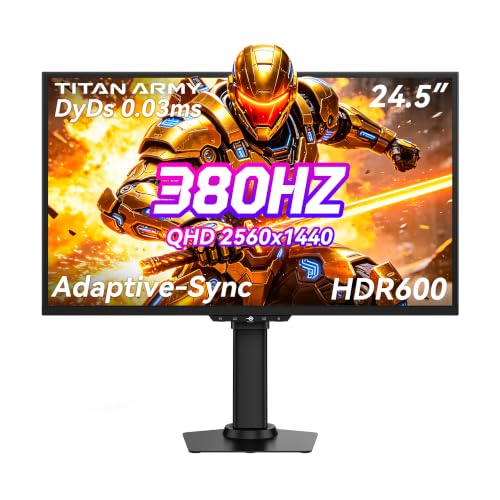 TITAN ARMY 24 Inch Gaming Monitor 380Hz 360Hz24.5"9.1 x 22.17 x 20.55 inches13.9 PoundsCheck on Amazon
 AOC 27" Gaming Monitor QHD 360Hz QD OLED27" 360Hz AOC Gaming28.74 x 18.9 x 7.4 inchesCheck on Amazon

Top 3 Picks
Best overall: ASUS ROG Strix XG27ACDNG
The XG27ACDNG combines the two things that matter most at 360Hz: a QD-OLED panel with a 0.03ms rated response, and a custom heatsink that spreads heat away from the organic layers instead of relying on a small internal fan or passive venting alone. On a 26.5-inch 2560×1440 canvas it works out to roughly 111 pixels per inch, which is the sweet spot for competitive play without the text fringing you notice on lower-density large panels. It is the pick for someone who wants one monitor to do everything well for a long time.
Best budget: LG 27G810A-B
Most cheap 360Hz monitors force a choice between resolution and speed. The 27G810A-B does not: it is a dual-mode IPS panel that runs 3840×2160 at 180Hz for desktop work, video, and slower games, then switches to 1920×1080 at 360Hz when you need the fastest possible frame cadence. You give up OLED black levels and per-pixel contrast, but you gain 4K productivity, no burn-in risk, and a price tier that sits at the entry end of this list.
Best premium: Samsung Odyssey OLED G6 (G60SD)
For buyers who want the finished product rather than the cheapest route to 360Hz, the Odyssey OLED G6 pairs a 27-inch QHD QD-OLED panel with 360Hz, a 0.03ms rated response, and AMD FreeSync Premium Pro support. The chassis, OSD, and HDR tuning are the most polished in this group, and it is the natural fit if you also run a modern console alongside a PC. The MSI MPG 271QRX is the closest alternative and wins on raw HDR presentation.
Quick Comparison
Every monitor below is a real, currently listed product. Price tiers are relative bands, not fixed figures, because street prices on 360Hz panels move weekly.
| Product | Best for | Key specs | Price tier |
|---|---|---|---|
| ASUS ROG Strix XG27ACDNG | Long-life 1440p QD-OLED with thermal headroom | 26.5-inch QD-OLED, 2560×1440, 360Hz, 0.03ms, custom heatsink | Premium |
| Alienware AW2725DF | Mid-range route into 1440p OLED | 26.7-inch QD-OLED, 2560×1440, 360Hz, 0.03ms, AMD FreeSync Premium Pro | Mid-range |
| LG 27G810A-B UltraGear | One screen for 4K work and 360Hz play | 27-inch IPS, 3840×2160 at 180Hz or 1920×1080 at 360Hz, 1ms | Budget |
| GAMEPOWER Rapid 27 | Lowest-cost entry into 360Hz | 27-inch flat IPS, 1920×1080, 360Hz, 1ms, HDR10, height/tilt/swivel/pivot stand | Budget |
| TITAN ARMY 24 | Small desks and high pixel density | 24-inch Fast IPS, 2560×1440, 380Hz/360Hz, HDR600 | Mid-range |
| AOC Q27G40SDE | G-SYNC Compatible QD-OLED value | 27-inch QD-OLED, 2560×1440, 360Hz, NVIDIA G-SYNC Compatible | Mid-range |
| Samsung Odyssey OLED G6 (G60SD) | Premium polish, PC plus console | 27-inch QD-OLED, 2560×1440, 360Hz, 0.03ms, AMD FreeSync Premium Pro | Premium |
| MSI MPG 271QRX | HDR-first QD-OLED buyers | 27-inch QD-OLED, 2560×1440, 360Hz, 0.03ms, True Black HDR | Premium |
| ETiansu 27-inch 360Hz QHD Fast IPS | Cheapest 1440p 360Hz IPS | 27-inch Fast IPS, 2560×1440, 360Hz, 0.5ms rated, FreeSync + G-Sync compatible, HDR400, VESA | Budget |
How We Chose
This roundup is built from published specification sheets, manufacturer documentation, and the well-documented behaviour of the panel technologies involved. No unit here was tested, benchmarked, or owned by us, and no claim below depends on hands-on measurement.
The first filter was refresh rate honesty. A monitor earns a place here only if its listing states a genuine 360Hz or higher refresh mode at native resolution, not an interpolated number or an overclock that voids the warranty. The second filter was panel class, because that single decision drives contrast, response behaviour, text clarity, and burn-in risk more than any other spec. The third was connectivity: a 360Hz panel is wasted if its ports cannot carry the signal, so DisplayPort version, DSC support, and HDMI 2.1 capability were checked against the bandwidth each resolution actually needs.
We then weighed category fit and upgrade path. Budget picks had to justify themselves against the next tier up rather than simply being cheap, and premium picks had to offer something structural — a heatsink, better HDR tuning, stronger warranty terms — rather than a badge. Finally, each entry was matched to the use case it genuinely serves, from 1080p esports on a small desk to dual-mode 4K productivity. The result is a list where every monitor has a reason to exist and a clearly stated situation it suits.
1. ASUS ROG Strix XG27ACDNG – Best for 1440p QD-OLED Buyers Who Want the Longest Service Life
As an Amazon Associate we earn from qualifying purchases at no extra cost to you.

The XG27ACDNG is the most complete 360Hz package in this roundup, and the reason is thermal design rather than raw numbers. Its listing describes a 26.5-inch QD-OLED panel at 2560×1440 with a 360Hz refresh rate, a 0.03ms rated response time, and a custom heatsink. That heatsink matters more than the spec sheet suggests. OLED pixels degrade in proportion to the heat and current they experience, so a monitor that pulls heat out of the panel stack keeps its brightness and colour volume closer to factory levels for longer. If you are spending premium money and intend to keep the screen for five or more years, this is the structural advantage worth paying for.
At 26.5 inches and 2560×1440, the pixel density lands around 111 pixels per inch. That is dense enough that text and UI elements look crisp at normal desktop viewing distance, and it is the reason 1440p has become the default resolution for competitive players who also work on the same machine. A 27-inch 1080p panel sits near 82 pixels per inch by comparison, which is visible in small fonts and fine map detail. The trade is that 1440p at 360Hz is a demanding target for any GPU, so this monitor rewards a card that can actually push frames rather than one that merely supports the output.
Key specs as listed
- Panel: QD-OLED, 26.5-inch diagonal
- Resolution: 2560×1440 (QHD)
- Refresh rate: 360Hz
- Rated response: 0.03ms
- Thermal design: custom heatsink
- Adaptive sync: VRR support for modern GPU families
- Typical pixel density: roughly 111 PPI
What you actually notice in play is the combination of near-zero pixel transition and a 2.78ms frame interval. At 360Hz, each frame occupies 2.78 milliseconds on screen. When a panel can change pixel state far faster than that interval, you stop seeing ghosting trails behind moving targets and start seeing the frame boundaries themselves. In fast strafing and tracking scenarios, that is the difference between reading a target’s position accurately and inferring it from a smear. QD-OLED also delivers per-pixel light control, so a bright muzzle flash next to a dark doorway does not wash the doorway out the way a 1000:1 IPS panel would.
Ownership realities are worth planning for. OLED panels accumulate wear unevenly if you leave static elements — taskbars, HUDs, spreadsheet grids — on screen for hours at high brightness. Modern monitors mitigate this with automatic pixel refresh cycles that run when the display sleeps, and with panel refresh routines that run less often. The practical routine is to let those cycles complete, keep desktop brightness moderate rather than maximum, hide the taskbar, and avoid leaving a single static window parked in the same spot for a full working day. Do that and the heatsink gives you additional margin. Skip it and even a well-cooled panel will drift.
Compared with the Alienware AW2725DF, the nearest alternative here, the ASUS is the more premium, more thermally engineered option, while the Alienware targets the same 1440p QD-OLED formula at a mid-range tier. Compared with the MSI MPG 271QRX, the ASUS trades some HDR headline emphasis for the heatsink story. If longevity and a single do-everything screen are your priorities, this is the one.
Pros
- Custom heatsink is a genuine longevity feature on an OLED panel
- 360Hz plus 0.03ms rated response delivers class-leading motion clarity
- 1440p at roughly 111 PPI balances sharpness and GPU load well
- QD-OLED contrast makes dark-scene detail readable without crushing
Cons
- Premium tier pricing for a 26.5-inch screen
- OLED wear is cumulative and demands sensible desktop habits
- 1440p at 360Hz needs a strong GPU to be worth it
- Subpixel layout on QD-OLED can show slight colour fringing on small text
2. Alienware AW2725DF – Best for Competitive 1440p Play on a Mid-Range Tier

The AW2725DF is the monitor most people should look at first if they want 1440p OLED at 360Hz without moving into the top price tier. Its listing describes a 26.7-inch Quantum-Dot WQHD panel at 2560×1440, a 360Hz refresh rate, a 0.03ms rated response, and AMD FreeSync support. In practice that means the same core motion performance as the premium OLEDs in this roundup, packaged in a chassis that competes on price rather than on exotic thermal engineering.
The 26.7-inch diagonal produces roughly 110 pixels per inch, which is functionally identical to the 26.5-inch ASUS and slightly denser than a 27-inch 1440p panel. At this density, map text, ammo counters, and small UI icons stay legible without scaling, and desktop work is comfortable at a viewing distance of about 32 to 36 inches. That last figure matters more than most buyers expect: at 27 inches and 1440p, sitting closer than roughly 30 inches forces your eyes to travel across more of the screen per glance, which is fine for immersion and worse for tracking a corner-mounted minimap.
Key specs as listed
- Panel: Quantum-Dot OLED, 26.7-inch diagonal
- Resolution: 2560×1440 (WQHD)
- Refresh rate: 360Hz
- Rated response: 0.03ms
- Adaptive sync: AMD FreeSync (Premium Pro class on this model line)
- Typical pixel density: roughly 110 PPI
- Frame interval at 360Hz: 2.78ms
Where this monitor earns its place is the value curve. Going from a 1440p 240Hz OLED to a 1440p 360Hz OLED cuts the frame interval from 4.17ms to 2.78ms, a saving of 1.39 milliseconds. That is real but modest, and it is the reason 240Hz OLEDs remain defensible buys. Where the Alienware beats a 240Hz alternative is not the raw interval but the combination: 360Hz headroom means that when your GPU renders 300 frames per second in a lighter title, you see all 300 instead of capping at 240. If your frame rates routinely sit between 240 and 360, the extra refresh ceiling is doing work. If they sit at 150, it is not.
FreeSync support means variable refresh works across a wide window on AMD cards and on most modern GPUs that support the open standard over DisplayPort. That matters because a locked 360Hz is unrealistic in demanding titles. VRR lets the panel follow your actual frame rate instead of stuttering between fixed intervals, and it removes the tearing that would otherwise force you to choose between vsync lag and visual artifacts. Confirm your GPU’s VRR support before buying, since the feature is what makes a high-refresh panel pleasant rather than merely fast.
Compared with the ASUS ROG Strix XG27ACDNG, the Alienware gives up the custom heatsink and some premium chassis polish in exchange for a mid-range tier position — a reasonable trade if you replace monitors every few years rather than keeping them for a decade. Compared with the AOC Q27G40SDE, the Alienware is the more established 1440p OLED formula, while the AOC leans on G-SYNC Compatible certification. Both are sensible; pick on price and availability at the moment you buy.
Pros
- Mid-range tier entry into 1440p QD-OLED at 360Hz
- 0.03ms rated response matches far more expensive panels
- FreeSync variable refresh smooths real-world frame rates
- 26.7-inch size keeps pixel density high without a huge desk footprint
Cons
- No heatsink-class thermal design to lean on for long-term OLED life
- Still a meaningful spend compared with 1440p IPS options
- OLED burn-in habits still apply
- Benefits shrink sharply if your GPU rarely exceeds 240 frames per second
3. LG 27G810A-B UltraGear – Best for Dual-Mode Flexibility (4K Work, 360Hz Play)

The 27G810A-B is the most versatile monitor in this roundup and the one that solves the most common conflict in a single-screen setup. Its listing describes a 27-inch UltraGear IPS panel with dual-mode operation: 3840×2160 at 180Hz, or 1920×1080 at 360Hz, with a 1ms rated response. That means one screen can be a sharp 4K workspace during the day and a 360Hz competitive display at night, with a menu toggle rather than a second purchase.
The 4K mode is the part that quietly matters most. At 27 inches, 3840×2160 works out to roughly 163 pixels per inch, which is dense enough that text rendering looks close to a good laptop display. Photo editing, CAD, spreadsheet work, and video timelines all benefit from that density, and 180Hz is far smoother than the 60Hz most office monitors run. When you switch to 1080p at 360Hz, pixel density drops to about 82 PPI — soft for text, but irrelevant in a fast shooter where you are tracking movement rather than reading small type.
Key specs as listed
- Panel: IPS, 27-inch diagonal
- Mode 1: 3840×2160 (4K UHD) at 180Hz
- Mode 2: 1920×1080 (FHD) at 360Hz
- Rated response: 1ms
- Typical pixel density: roughly 163 PPI at 4K, roughly 82 PPI at 1080p
- Adaptive sync: variable refresh support over DisplayPort
IPS is the right panel choice for this job. It holds colour and brightness across wide viewing angles, shows no meaningful burn-in risk, and handles static desktop content all day without the maintenance routine an OLED demands. The cost is contrast: a typical IPS panel sits around 1000:1, so black bars in letterboxed video and dark corners in games look grey rather than deep. If your work involves a lot of dark-mode reading or you watch films on the same screen, that is a visible compromise. If your work is spreadsheets, code, and documents, it is close to irrelevant.
The practical caveat is that 1080p at 360Hz is a much lighter signal load than 1440p at 360Hz. That is good news for your GPU — a mid-range card can genuinely hit 360 frames per second at 1080p in many competitive titles, where 1440p at the same rate would be out of reach. The bad news is that switching modes changes your effective workspace, so window layouts and per-game settings need attention. Most players set up two profiles: a desktop profile at 4K/180Hz and a game profile at 1080p/360Hz, and switch at the monitor OSD.
Compared with the GAMEPOWER Rapid 27, the LG costs more but delivers a genuine 4K mode, better build, and a more useful stand. Compared with the ETiansu 27-inch 1440p Fast IPS, the LG trades 1440p native resolution at 360Hz for 4K productivity plus 1080p speed. If you need one screen for professional work and competitive play, the LG’s dual-mode approach is the most efficient answer on this list. If you only play games, a native 1440p 360Hz panel is the cleaner choice.
Pros
- Dual-mode gives both 4K/180Hz and 1080p/360Hz from one screen
- IPS panel means no burn-in risk and excellent text clarity at 4K
- 1080p at 360Hz is achievable on far more GPUs than 1440p at 360Hz
- Strong value for a hybrid work-and-play desk
Cons
- IPS contrast around 1000:1 limits dark-scene depth and HDR impact
- 1080p mode looks soft for desktop work
- Mode switching requires OSD navigation and per-game profile setup
- 1ms rated response is slower in real transitions than OLED
4. GAMEPOWER Rapid 27 – Best for the Lowest-Cost Entry into 360Hz

If the goal is simply to experience 360Hz with the smallest possible outlay, the Rapid 27 is the entry point. Its listing describes a 27-inch flat IPS panel at 1920×1080 with a 360Hz refresh rate, a 1ms rated response, HDR10 support, and a stand with height, tilt, swivel, and pivot adjustment. That last detail is more valuable than it sounds at this price tier, because many budget monitors ship with tilt-only stands that force you to stack books under the base.
The honest framing is that 1080p at 27 inches is not sharp. Pixel density lands around 82 PPI, which means visible pixel structure on text and a slightly soft look on fine detail. What you get in exchange is the lowest barrier to a 2.78ms frame interval and the easiest 360 frames per second your GPU will ever be asked to render. At 1080p, a mid-range card can genuinely sustain high triple-digit frame rates in competitive shooters, which is the only situation where 360Hz pays off. This is a monitor for someone whose priority is motion, not image quality.
Key specs as listed
- Panel: flat IPS, 27-inch diagonal
- Resolution: 1920×1080 (FHD)
- Refresh rate: 360Hz
- Rated response: 1ms
- HDR: HDR10 support
- Stand: height, tilt, swivel, and pivot adjustment
- Typical pixel density: roughly 82 PPI
Adaptive sync and HDR10 support are listed, and both deserve realistic expectations. Variable refresh is genuinely useful here because no GPU holds 360 frames per second consistently in every title, and VRR prevents the stutter that would otherwise appear when frames arrive unevenly. HDR10 support on a budget IPS panel, however, should be read as signal compatibility rather than a true high dynamic range experience. Without local dimming zones or per-pixel light control, peak brightness and contrast are limited, so HDR content will look slightly brighter and slightly flatter rather than dramatically better. Treat HDR as a bonus, not a reason to buy.
Ergonomics are where this monitor punches above its tier. A full four-way adjustable stand lets you set the panel at eye level, which is the single most effective fix for the neck and shoulder strain that comes from a monitor sitting too low on a desk. Pivot also means you can rotate to portrait for long documents or chat columns. If you are building a first competitive setup on a tight budget, a stand you do not have to replace is worth real money.
Compared with the LG 27G810A-B, the GAMEPOWER gives up the 4K mode and the higher pixel density in exchange for a lower price and a simpler single-purpose design. Compared with the ETiansu 27-inch 1440p Fast IPS, it gives up resolution at the same refresh rate. The case for it is narrow but real: if you play only fast competitive titles, sit close to the screen, and want the cheapest possible path to 360Hz with a usable stand, this is the one. If you do anything else on the same monitor, spend more.
Pros
- Lowest-cost way to reach a genuine 360Hz refresh rate
- Full height, tilt, swivel, and pivot stand at a budget tier
- 1080p is easy for mid-range GPUs to drive at very high frame rates
- Flat IPS avoids the viewing-angle and curvature issues of cheap VA panels
Cons
- 82 PPI at 27 inches looks soft for text and desktop work
- HDR10 is signal support rather than a true HDR experience
- IPS contrast around 1000:1 limits dark-scene depth
- 1ms rated response cannot match OLED pixel transitions
5. TITAN ARMY 24 – Best for Small Desks and High Pixel Density

The TITAN ARMY 24 is the odd one out in the best possible way: a 24-inch panel at 2560×1440 with a 380Hz/360Hz refresh rate, HDR600 support, and a Fast IPS panel. Twenty-four inches at 1440p works out to roughly 122 pixels per inch, the densest combination on this list and the closest thing to a sweet spot for players who sit close to their screen and want every pixel to count.
Why density matters at this size is a geometry question. A 24-inch monitor at a normal desk distance occupies less of your field of view than a 27-inch screen, so your eyes travel less to read the edges. Combined with 122 PPI, small UI elements and distant targets in a shooter are rendered with more clarity per unit of screen area. Many professional esports players still prefer 24 to 25-inch displays for exactly this reason, even when larger panels are available. If your desk is shallow or your room is small, this is also the easiest fit here.
Key specs as listed
- Panel: Fast IPS, 24-inch diagonal
- Resolution: 2560×1440 (2K QHD)
- Refresh rate: 380Hz with 360Hz operation
- HDR: HDR600 support
- Typical pixel density: roughly 122 PPI
- Frame interval at 360Hz: 2.78ms; at 380Hz: 2.63ms
Fast IPS is a meaningful step above standard IPS for motion. The technology uses faster liquid crystal formulations and overdrive tuning to shorten grey-to-grey transitions, which reduces the trailing you see behind fast-moving objects. It still cannot match the 0.03ms rated transitions of a QD-OLED, and aggressive overdrive can introduce overshoot — a bright halo that appears ahead of a moving edge when the panel is pushed too hard. In practice, Fast IPS at 360Hz looks crisp and clean with mild overshoot on the fastest setting, and most users end up one notch below maximum overdrive.
The HDR600 rating is worth understanding precisely. It indicates a panel capable of roughly 600 nits peak brightness in HDR content, which is a real step above basic HDR400 displays and enough to make highlights in games and video pop. It does not mean per-pixel light control, so dark scenes will still look somewhat lifted compared with an OLED. Think of it as a genuinely useful brightness headroom rather than a cinematic HDR experience. For a mid-range tier monitor, that is a fair and honest positioning.
Compared with the ETiansu 27-inch 1440p Fast IPS, the TITAN ARMY trades two inches of diagonal for roughly 12 percent more pixel density, a slightly higher refresh ceiling, and a stronger HDR rating. Compared with the GAMEPOWER Rapid 27, it costs more but delivers native 1440p instead of 1080p, which is a far bigger jump in usable sharpness than the refresh rate difference suggests. If your desk is small, your eyes sit close to the panel, and you want 1440p without a 27-inch footprint, this is the most sensible pick in the roundup.
Pros
- Roughly 122 PPI is the densest panel here and looks very sharp
- 380Hz ceiling gives headroom above 360Hz for lighter titles
- HDR600 is a meaningful brightness step over HDR400 displays
- 24-inch size fits shallow desks and small rooms easily
Cons
- Smaller screen is less immersive for cinematic and single-player games
- Fast IPS still shows more motion trailing than QD-OLED
- Aggressive overdrive can produce visible overshoot halos
- 1440p at high frame rates still demands a capable GPU
6. AOC Q27G40SDE – Best for G-SYNC Compatible QD-OLED Value

The Q27G40SDE is AOC’s 27-inch QHD QD-OLED running at 360Hz with NVIDIA G-SYNC Compatible certification. It sits in the mid-range tier and delivers the same fundamental motion package as the premium OLEDs here: per-pixel light control, near-instant pixel transitions, and a 360Hz refresh ceiling. For buyers who want OLED contrast and speed without paying top-tier prices, it is one of the strongest positions on this list.
G-SYNC Compatible certification is worth a note, because the naming confuses people. It does not mean the monitor contains a dedicated G-SYNC hardware module with variable overdrive. It means the panel has been validated by NVIDIA to deliver a clean variable refresh experience over DisplayPort, without the flickering or blanking that poorly implemented adaptive sync can produce. In practice, that validation is a useful quality signal. It reduces the odds that you will fight VRR flicker in dark scenes, a common annoyance on OLED panels where gamma shifts as refresh rate changes.
Key specs as listed
- Panel: QD-OLED, 27-inch diagonal
- Resolution: 2560×1440 (QHD)
- Refresh rate: 360Hz
- Adaptive sync: NVIDIA G-SYNC Compatible
- Typical pixel density: roughly 109 PPI
- Frame interval at 360Hz: 2.78ms
The 27-inch 1440p combination produces about 109 PPI, which is the mainstream standard for this class and a comfortable density for both gaming and general desktop work. At 27 inches you want to sit roughly 32 to 36 inches back to see the whole panel without scanning. That is a larger footprint than a 24-inch screen, so measure your desk depth before committing. A 27-inch monitor on a 24-inch-deep desk leaves very little space between your eyes and the panel, and the resulting eye strain is one of the most common complaints from buyers who upgrade size without checking geometry.
OLED ownership on this model follows the same rules as the rest of the OLEDs here. Pixel refresh cycles run automatically when the display is idle, and they take several minutes. Do not interrupt them by waking the monitor. Panel refresh routines run less frequently and take longer, often around an hour on some models, and manufacturers typically recommend running them when prompted. Keep desktop brightness moderate, hide the taskbar, and avoid parking a static element in the same location for entire working days. OLED wear is cumulative and uneven, and the mitigations are behavioural as much as technical.
Compared with the Alienware AW2725DF, the AOC offers a similar 1440p QD-OLED 360Hz formula with G-SYNC Compatible validation instead of FreeSync emphasis, which matters if you want NVIDIA’s validation specifically. Compared with the Samsung Odyssey OLED G6, it gives up some chassis polish and HDR tuning in exchange for a lower tier position. If you want the cheapest credible path to 1440p QD-OLED at 360Hz with adaptive sync you can trust, this is a strong candidate.
Pros
- QD-OLED contrast and per-pixel light control at a mid-range tier
- G-SYNC Compatible certification reduces VRR flicker risk
- 27-inch 1440p at roughly 109 PPI suits gaming and desktop work
- 360Hz at 2.78ms frame intervals delivers top-tier motion clarity
Cons
- OLED burn-in risk requires ongoing desktop discipline
- No dedicated G-SYNC module, so certification is validation rather than hardware
- Premium-tier motion at a mid-range price still costs meaningfully more than IPS
- 27-inch size needs a reasonably deep desk
7. Samsung Odyssey OLED G6 (G60SD) – Best for Premium QD-OLED Polish and PC Plus Console Setups

The Odyssey OLED G6, model G60SD, is Samsung’s 27-inch QHD QD-OLED running at 360Hz with a 0.03ms rated response and AMD FreeSync Premium Pro support. It occupies the premium tier and justifies that position with the most complete overall package here: refined chassis design, a well-developed on-screen menu system, and HDR tuning that has been the subject of considerable coverage in the display community since this panel generation arrived.
FreeSync Premium Pro is the strongest tier of AMD’s adaptive sync programme, and the Pro suffix specifically covers HDR plus variable refresh working together. That combination matters on an OLED, because HDR content at varying refresh rates can otherwise produce visible brightness shifts. Premium Pro certification indicates the panel has been validated to handle that interaction. For a PC plus console desk, this is also the most console-friendly premium option in the roundup, since modern consoles output high frame rates and benefit from a panel that can accept and display them without the scaling artifacts older displays introduce.
Key specs as listed
- Panel: QD-OLED, 27-inch diagonal
- Resolution: 2560×1440 (QHD)
- Refresh rate: 360Hz
- Rated response: 0.03ms
- Adaptive sync: AMD FreeSync Premium Pro
- Typical pixel density: roughly 109 PPI
What separates this from the mid-range OLEDs is mostly refinement rather than raw capability. The 0.03ms rated response and 360Hz refresh are shared across most QD-OLED models at this size, because the panels themselves come from a small number of suppliers. The differences live in the electronics around the panel: overdrive tuning, VRR handling at low frame rates, gamma tracking in HDR, and the quality of the brightness limiting behaviour. OLED panels reduce full-screen brightness as more of the screen turns white, to protect the pixels and manage power. How gracefully a monitor does that — and how visible the transition is — varies meaningfully between implementations, and it is one of the things premium pricing buys.
For anyone coming from a 144Hz or 165Hz display, the step to 360Hz is dramatic. Frame interval drops from 6.94ms at 144Hz to 2.78ms at 360Hz, a saving of 4.16 milliseconds per frame. Combined with near-instant pixel transitions, that produces the crisp, almost stroboscopic clarity that high-refresh OLED is known for. For anyone coming from 240Hz, the step is smaller: 4.17ms down to 2.78ms, a saving of 1.39 milliseconds. That is perceptible in fast tracking but far less transformative. Be honest about which upgrade you are actually making.
Compared with the MSI MPG 271QRX, the Samsung is the more polished all-rounder while the MSI leans harder into HDR presentation with its True Black HDR positioning. Compared with the AOC Q27G40SDE, the Samsung costs more but adds FreeSync Premium Pro and a more refined overall package. If you want the premium OLED experience with the fewest rough edges and you also game on a console, this is the pick.
Pros
- FreeSync Premium Pro covers HDR and variable refresh together
- 0.03ms rated response and 360Hz deliver class-leading motion clarity
- Refined HDR tuning and brightness limiting behaviour
- Strong fit for a desk that mixes PC and console gaming
Cons
- Premium tier pricing for the same core panel technology as cheaper OLEDs
- OLED burn-in precautions still apply
- Diminishing returns if you are upgrading from a 240Hz OLED
- 1440p at 360Hz is a heavy GPU target
8. MSI MPG 271QRX – Best for HDR-First QD-OLED Buyers

The MPG 271QRX is MSI’s 27-inch QD-OLED at 2560×1440 with a 0.03ms rated response, 360Hz refresh, and True Black HDR positioning. It sits in the premium tier alongside the Samsung Odyssey OLED G6, and the distinction between them is mostly philosophical: the Samsung aims for all-round polish, while the MSI leans into HDR presentation as its headline strength.
True Black HDR is a VESA certification tier that recognises OLED’s ability to render true black at the pixel level, which LCD panels cannot do regardless of how many dimming zones they carry. The practical benefit shows up in content with high contrast — night scenes, neon-lit environments, space settings, and any title that mixes deep shadow with bright light sources. On a typical IPS panel, a bright object in a dark room lifts the surrounding black to a grey haze. On a QD-OLED, the pixels next to it stay off, so the contrast ratio in that local area is effectively unlimited. That is a genuine, visible difference, not a spec-sheet curiosity.
Key specs as listed
- Panel: QD-OLED, 27-inch diagonal
- Resolution: 2560×1440 (QHD)
- Refresh rate: 360Hz
- Rated response: 0.03ms
- HDR: True Black HDR certification
- Typical pixel density: roughly 109 PPI
The trade-off with OLED HDR is full-screen brightness. Because the panel limits total light output to protect the organic material, a scene that is mostly white — a snowfield, a bright web page, a document — will not look as punchy as it would on a good IPS panel, which can hold several hundred nits across the whole screen. OLED excels in small-window highlights, where a bright element against a dark background can be pushed very high. This is why OLED HDR looks spectacular in games and mixed content, and less impressive on a full-screen white spreadsheet. Understand that asymmetry before you buy, because it is the single most common surprise for new OLED owners.
At 27 inches and 2560×1440, the pixel density is roughly 109 PPI, which is comfortable for desktop use at around 32 to 36 inches of viewing distance. QD-OLED uses a triangular subpixel arrangement in many implementations, and that layout can produce subtle colour fringing on very small text — visible if you look for it on thin font weights, usually invisible in games and normal UI sizes. If your work involves hours of reading small text, compare this against an IPS panel like the LG 27G810A-B before deciding, because text rendering is where OLED and IPS differ most obviously in day-to-day use.
Compared with the Samsung Odyssey OLED G6, the MSI emphasises HDR presentation while the Samsung emphasises overall refinement and console-friendliness. Compared with the ASUS ROG Strix XG27ACDNG, the MSI trades the custom heatsink for stronger HDR positioning. If your library leans toward atmospheric, high-contrast titles and you want the deepest blacks available at 360Hz, this is the one to shortlist.
Pros
- True Black HDR delivers genuinely unlimited local contrast
- 0.03ms rated response plus 360Hz for top-tier motion clarity
- Excellent for dark, high-contrast games and mixed media
- 27-inch 1440p at roughly 109 PPI suits both play and work
Cons
- Full-screen brightness is lower than a good IPS panel
- Small-text fringing possible due to QD-OLED subpixel layout
- Premium tier pricing
- OLED maintenance cycles and burn-in precautions apply
9. ETiansu 27-inch 360Hz QHD Fast IPS – Best for Cheap 1440p 360Hz Without OLED Risk

The ETiansu 27-inch panel is the budget route to native 1440p at 360Hz. Its listing describes a 2560×1440 Fast IPS panel with a 360Hz refresh rate, a 0.5ms rated response, FreeSync and G-Sync compatible adaptive sync, HDR400 support, and VESA mounting. For buyers who want 1440p sharpness and 360Hz speed but do not want to take on OLED wear, maintenance cycles, or premium pricing, this is the most direct answer on the list.
Fast IPS with a 0.5ms rating is a different kind of fast from OLED. The rating is typically measured under specific transition conditions and often reflects MPRT-style figures rather than worst-case grey-to-grey transitions, which in real content can run several milliseconds. That means you will see some trailing behind fast-moving objects, especially in dark-to-light transitions where liquid crystals respond slowest. It is a long way from bad — Fast IPS at 360Hz looks crisp and competitive — but it is not the same experience as a QD-OLED at 0.03ms, and buyers should not expect it to be.
Key specs as listed
- Panel: Fast IPS, 27-inch diagonal
- Resolution: 2560×1440 (QHD)
- Refresh rate: 360Hz
- Rated response: 0.5ms
- Adaptive sync: FreeSync and G-Sync compatible
- HDR: HDR400 support
- Mounting: VESA compatible
- Typical pixel density: roughly 109 PPI
HDR400 is the entry tier of VESA’s display HDR programme. It indicates the panel can reach roughly 400 nits peak brightness in HDR content and accepts an HDR10 signal. It does not require local dimming, which means contrast in HDR content is essentially the same as SDR contrast — around 1000:1 on a typical IPS panel. Treat HDR400 as signal compatibility rather than a transformative HDR experience. It is still useful, because a 400-nit panel is bright enough for a well-lit room, and many buyers find a bright, evenly lit screen more comfortable than a dimmer one with deeper blacks.