Best UPS Battery Backup for Home and Office
What's inside
- Top 3 Picks
- Quick Comparison
- How We Chose
- 1. CyberPower ST425 – Best for Budget Router and Modem Protection
- 2. CyberPower CP1500PFCLCD – Best for PFC Desktop Workstations
- 3. APC BE600M1 – Best for Home Office Router, Modem, and NAS
- 4. APC BX1500M – Best for High-Wattage Office Desktops
- 5. CyberPower EC850LCD – Best for Energy-Conscious Multi-Device Setups
- 6. APC BE425M – Best for Small Electronics and a Single Router
- 7. CyberPower CP1500AVRLCD3 – Best for Big Screens and Multi-Device Desks
- 8. Staples TECH 650VA UPS – Best for Simple Budget Backup
- 9. CyberPower ST625U – Best for Mid-Range Home Networking
- How to Choose
- Frequently Asked Questions
- The Short Version
- Top 3 Picks
- Quick Comparison
- How We Chose
- 1. CyberPower ST425 – Best for Budget Router and Modem Protection
- 2. CyberPower CP1500PFCLCD – Best for PFC Desktop Workstations
- 3. APC BE600M1 – Best for Home Office Router, Modem, and NAS
- 4. APC BX1500M – Best for High-Wattage Office Desktops
- 5. CyberPower EC850LCD – Best for Energy-Conscious Multi-Device Setups
- 6. APC BE425M – Best for Small Electronics and a Single Router
- 7. CyberPower CP1500AVRLCD3 – Best for Big Screens and Multi-Device Desks
- 8. Staples TECH 650VA UPS – Best for Simple Budget Backup
- 9. CyberPower ST625U – Best for Mid-Range Home Networking
- How to Choose
- Frequently Asked Questions
- The Short Version
As an Amazon Associate I earn from qualifying purchases. This post may contain affiliate links at no extra cost to you.
The best UPS battery backup for most homes and small offices is the CyberPower CP1500PFCLCD. Its 1500 VA / 1000 W rating, pure sine wave output, and line-interactive automatic voltage regulation make it the one unit in this roundup that can sit behind a modern desktop tower with an active PFC power supply, a monitor, a router, and a network switch at the same time without straining. If your setup is smaller — a router, a modem, and maybe a NAS — the APC BE600M1 covers it for far less money and takes up a fraction of the desk space. Buyers on a tight budget who only need to keep an internet connection alive through short outages should look at the CyberPower ST425. The rest of this guide compares wattage, outlet types, runtime, battery replacement, and form factor so you can match a specific unit to specific equipment instead of guessing from the VA number on the box.
Contents
- Top 3 Picks
- Quick Comparison
- How We Chose
- 1. CyberPower ST425 – Best for Budget Router and Modem Protection
- 2. CyberPower CP1500PFCLCD – Best for PFC Desktop Workstations
- 3. APC BE600M1 – Best for Home Office Router, Modem, and NAS
- 4. APC BX1500M – Best for High-Wattage Office Desktops
- 5. CyberPower EC850LCD – Best for Energy-Conscious Multi-Device Setups
- 6. APC BE425M – Best for Small Electronics and a Single Router
- 7. CyberPower CP1500AVRLCD3 – Best for Big Screens and Multi-Device Desks
- 8. Staples TECH 650VA UPS – Best for Simple Budget Backup
- 9. CyberPower ST625U – Best for Mid-Range Home Networking
- How to Choose
- Frequently Asked Questions
- The Short Version
Our Top Picks
 CyberPower ST425 Standby UPS Battery Backup and Surge425VA3.2 x 8.3 x 4.5 inches3.8 poundsCheck on Amazon
 CyberPower CP1500PFCLCD PFC Sinewave UPS Battery Backup and1500VA14 x 3.9 x 11 inches24.9 poundsCheck on Amazon
 APC BE600M1 UPS Battery Backup & Surge Protector4.13D x 10.79W x 5.47H inches10.79 x 4.13 x 5.47 inches7.5 poundsCheck on Amazon
 APC BX1500M UPS Battery Backup & Surge Protector1500VA15.04 x 3.94 x 9.84 inches28.44 PoundsCheck on Amazon
 CyberPower EC850LCD Ecologic UPS Battery Backup and Surge850VA LCD12.2 x 7 x 3.1 inches7.7 poundsCheck on Amazon
 APC BE425M UPS Battery Backup and Surge Protector425VA10 x 5.5 x 4.1 inches5.72 poundsCheck on Amazon
Top 3 Picks
Best overall: CyberPower CP1500PFCLCD. It is the only pick here that combines a true sine wave output with 1000 watts of capacity, so it handles active PFC power supplies, network attached storage, and office peripherals without the buzzing or shutdown problems that simulated sine wave units can cause. It suits anyone running a real desktop workstation plus networking gear on the same battery.
Best budget: CyberPower ST425. At 425 VA / 260 W it will not run a gaming rig, but it will hold a router, modem, and optical network terminal through a short outage and keep your Wi-Fi alive. Eight outlets, two USB charging ports, and a small footprint make it the sensible entry point for network-only protection.
Best premium: APC BX1500M. For high-wattage desktops, multiple monitors, and dense office desks, the BX1500M pairs a 1500 VA / 900 W rating with automatic voltage regulation and a wide outlet bank. It is the pick when you need headroom and outlet count more than you need a pure sine wave.
Quick Comparison
| Product | Best for | Capacity | Outlets | Key feature | Price tier |
|---|---|---|---|---|---|
| CyberPower ST425 | Router and modem only | 425 VA / 260 W | 8 (4 battery-backed) | 2 USB charging ports, compact body | Budget |
| CyberPower CP1500PFCLCD | PFC desktops and workstations | 1500 VA / 1000 W | 12 (6 battery-backed) | Pure sine wave, AVR, LCD, USB charging | Premium |
| APC BE600M1 | Home office router, modem, NAS | 600 VA / 330 W | 7 (5 battery-backed) | USB charging port, small tower | Mid-range |
| APC BX1500M | High-wattage office desktops | 1500 VA / 900 W | 10 (5 battery-backed) | AVR, wide outlet spacing | Premium |
| CyberPower EC850LCD | Energy-conscious multi-device setups | 850 VA / 510 W | 12 (battery and surge groups) | Ecologic master/controlled outlets, LCD | Mid-range |
| APC BE425M | Small electronics and a single router | 425 VA / 255 W | 6 (4 battery-backed) | Very small footprint | Budget |
| CyberPower CP1500AVRLCD3 | Large displays and multi-device desks | 1500 VA / 900 W | 12 (6 battery-backed) | AVR, intelligent LCD, USB charging | Premium |
| Staples TECH 650VA UPS | Simple budget backup | 650 VA class | 8 (battery and surge groups) | Straightforward outlet-only layout | Budget |
| CyberPower ST625U | Mid-range home networking | 625 VA / 340 W | 8 (4 battery-backed) | 2 USB charging ports, standby topology | Mid-range |
How We Chose
Selection started with the electrical fundamentals rather than brand familiarity. Every unit here had to publish a watt rating, not just a VA figure, because VA alone tells you almost nothing about whether a UPS can carry a real load. Units were then grouped by topology — standby, line-interactive with automatic voltage regulation, and line-interactive with pure sine wave output — since that distinction drives both price and which equipment the unit can safely support.
From there, the criteria were outlet architecture, runtime behavior at realistic loads, battery replacement economics, and physical form factor. Outlet count mattered less than the split between battery-backed and surge-only receptacles, because a unit with twelve outlets and four on battery is a very different product from one with eight outlets and six on battery. Battery replacement was assessed on how common the replacement pack is and how the unit behaves when the pack reaches end of life.
Form factor was judged against where these units actually live: on a desk, on a shelf, or on the floor beside a network closet. Finally, each pick was assigned a use case where it is the strongest option in this group, which is why several categories appear more than once. Nothing here was tested, benchmarked, or handled; the assessments are built from published specifications, manufacturer documentation, and category-wide engineering conventions.
1. CyberPower ST425 – Best for Budget Router and Modem Protection
As an Amazon Associate we earn from qualifying purchases at no extra cost to you.

The ST425 is the smallest sensible answer to a very specific question: how do I keep my internet connection alive during a two-minute brownout without spending real money? At 425 VA and 260 watts, it is not a computer UPS in any meaningful sense. It is a networking UPS, and for a router, a cable or fiber modem, and an optical network terminal drawing somewhere between 15 and 40 watts combined, it does that job well and cheaply.
Key specifications
- 425 VA / 260 W capacity
- Standby topology — switches to battery only when input voltage collapses
- 8 outlets: 4 battery-backed with surge protection, 4 surge-only
- 2 USB-A charging ports for phones and small devices
- Simulated sine wave output
- Compact, low-profile chassis suited to a shelf or the floor beside a modem
- Price tier: budget
Where it earns its place. The standby design is a genuine advantage in this price class, not a compromise. Standby units draw less overhead and run cooler than line-interactive models, and for equipment with a small, steady draw, that is exactly what you want. The two USB ports are unusually useful for the money — they turn the unit into a charging station on a desk where outlet space is scarce, and they work whether or not the battery is engaged. The eight-outlet layout also means you can put a printer or a desk lamp on the surge-only side without eating into your battery capacity.
The runtime picture is honest rather than impressive. Driving a router and modem combination in the 20 to 30 watt range, this class of unit typically delivers somewhere in the range of 30 to 60 minutes, which is enough to ride out most residential flickers and short utility switching events. Push it toward 100 watts and you are looking at single-digit minutes. That is not a flaw; it is a 260-watt device being asked to do a job it was never sized for.
Pros
- Lowest entry cost of any unit in this roundup
- Two USB charging ports included at the budget tier
- Eight outlets, so surge-only devices do not consume battery capacity
- Small and light enough to tuck behind furniture
- Standby design runs cool and quietly
Cons
- 260 watts rules out desktop towers, gaming PCs, and most monitors
- Simulated sine wave is unsuitable for active PFC power supplies
- No automatic voltage regulation, so it passes brownouts through
- Short runtime once the load climbs above roughly 60 watts
How it compares. The nearest alternative in this list is the APC BE425M, which sits in the same 425 VA class and the same budget tier. The BE425M has six outlets and no USB charging, while the ST425 has eight outlets and two USB ports — so for a desk where phones and small devices also need power, the CyberPower is the more flexible pick. The BE425M’s advantage is a slightly smaller body and a longer track record in APC’s Back-UPS line. If you find yourself wanting more headroom for a mini PC or a small NAS, the CyberPower ST625U is the natural step up: same outlet philosophy, 340 watts instead of 260.
2. CyberPower CP1500PFCLCD – Best for PFC Desktop Workstations

This is the unit to buy when the equipment behind it actually matters. A 1500 VA / 1000 W rating is the highest watt figure in this roundup, and the pure sine wave output is the reason it sits at the top of the recommendation. Anyone running a current-generation desktop with an active PFC power supply, a workstation with a discrete GPU, or a home lab with a NAS and a small server should be looking here rather than at a cheaper simulated sine wave unit.
Key specifications
- 1500 VA / 1000 W capacity
- Line-interactive topology with automatic voltage regulation (AVR)
- Pure sine wave output
- 12 outlets: 6 battery-backed with surge protection, 6 surge-only
- LCD status panel showing load, battery capacity, and estimated runtime
- USB charging ports on the front panel
- Mini-tower form factor, roughly the size of a small desktop speaker
- Price tier: premium
Why pure sine wave matters. Modern ATX power supplies use active power factor correction, which presents a non-linear load to the UPS. Simulated sine wave units can interact badly with these supplies, producing audible buzzing from the PSU, causing the supply to shut down during transfer, or in some cases refusing to transfer at all because the UPS misreads the load. A pure sine wave UPS removes that entire class of problem. It also matters for equipment with motors or sensitive analog stages, and it is the safer choice for any device you would be unhappy to replace.
Runtime and daily behavior. At a realistic workstation load — a tower drawing 150 to 250 watts plus a monitor — this class of unit generally provides enough runtime to save work and shut down cleanly, with substantially longer runtimes when only the tower and networking gear are on battery. The AVR function is the feature you will use far more often than the battery itself: it corrects sustained undervoltage and overvoltage without draining the battery, which is what protects equipment during the sagging-voltage events that precede many outages. The LCD panel makes load and runtime visible, which is genuinely useful when you are deciding whether one more device can be added.
Pros
- Pure sine wave output compatible with active PFC power supplies
- Highest watt rating in this roundup at 1000 W
- Automatic voltage regulation handles brownouts without battery drain
- LCD shows real-time load and estimated runtime
- Six battery-backed outlets is the most generous battery group here
Cons
- Premium price tier — the most expensive approach in this guide
- Physically larger than budget and mid-range units
- Significantly overkill for a router-and-modem-only setup
- Heavier battery pack makes replacement a two-hand job
How it compares. The obvious internal rival is the CyberPower CP1500AVRLCD3, which shares the 1500 VA class and the premium tier but rates 900 W and uses simulated sine wave output. The AVRLCD3 gives you the same outlet count and a similar LCD experience for less money, and for a desk of monitors, docking stations, and networking gear it is entirely adequate. The PFCLCD justifies its premium specifically when a desktop tower or NAS with a PFC supply is on the battery side. Against the APC BX1500M, the tradeoff is the same: the APC offers 900 W and a strong AVR implementation at a lower price, while the CyberPower adds the sine wave output that PFC hardware wants.
3. APC BE600M1 – Best for Home Office Router, Modem, and NAS

The BE600M1 is the pick for the setup that most people actually have: a router, a modem, a network switch, and a two-bay NAS on a shelf, none of which draw much power individually but all of which need to stay up together. At 600 VA / 330 W it has roughly 25 percent more watt headroom than the budget 425 VA units, and it packages that in a small tower that fits on a shelf without dominating it.
Key specifications
- 600 VA / 330 W capacity
- Line-interactive topology
- 7 outlets: 5 battery-backed with surge protection, 2 surge-only
- 1 USB charging port rated for fast charging of phones and tablets
- Simulated sine wave output
- Compact tower form factor with a small desk footprint
- Price tier: mid-range
Why the outlet split works here. Five battery-backed outlets is a lot for this capacity class, and it maps well onto a home network stack: router, modem, switch, NAS, and one spare for a smart home hub or a small access point. The two surge-only outlets absorb the devices you want protected but do not want draining the battery — a desk lamp, a phone charger, a monitor that is not critical. This is the practical difference between a unit designed for network gear and a generic power strip with a battery bolted on.
Runtime expectations. A typical home network stack draws somewhere between 30 and 60 watts. In that range, this class of unit generally holds the load for a meaningful stretch of time — long enough to cover brief outages and to let a NAS finish writing and shut down gracefully if it is configured to do so. The NAS detail matters: an ungraceful shutdown during a power event is one of the more common ways small storage arrays lose data, and a UPS at this capacity is the cheapest insurance against it. Add a desktop tower drawing 200 watts to the same unit and the runtime collapses to a few minutes, which is the signal that you need to move up to a 1500 VA model.
Pros
- Five battery-backed outlets suit a full network stack
- Small tower footprint fits on a shelf or in a media cabinet
- USB charging port adds desk utility
- Middle-ground price tier without the compromises of a 425 VA unit
- Well-matched to NAS graceful-shutdown workflows
Cons
- 330 watts is not enough for a desktop tower plus peripherals
- Simulated sine wave limits compatibility with PFC power supplies
- No LCD panel — status is limited to indicator lights
- Only two surge-only outlets, which can be tight on a crowded desk
How it compares. Against the CyberPower ST625U, the two units are close in capacity and price tier, and the decision comes down to outlet count versus capacity. The ST625U offers 625 VA / 340 W with eight outlets split four and four, plus two USB ports; the BE600M1 offers 600 VA / 330 W with seven outlets split five and two, plus one USB port. If you need more battery-backed receptacles, the APC wins. If you want more total outlets and more USB charging, the CyberPower wins. Against the CyberPower EC850LCD, the APC gives up capacity and the Ecologic energy-saving outlet scheme, but it costs less and occupies less space.
4. APC BX1500M – Best for High-Wattage Office Desktops

The BX1500M is aimed at the desk that has outgrown every smaller unit: a full tower, two or three monitors, a dock, external drives, and a desk phone, all drawing from one location. At 1500 VA / 900 W it has the wattage to carry that load, and its ten-outlet layout is spaced for chunky power bricks and angled plugs that do not fit side by side on cheaper strips.
Key specifications
- 1500 VA / 900 W capacity
- Line-interactive topology with automatic voltage regulation (AVR)
- 10 outlets: 5 battery-backed with surge protection, 5 surge-only
- Simulated sine wave (stepped approximation) output
- Widely spaced outlets that accommodate transformer blocks
- Full-size tower chassis designed to sit on the floor
- Price tier: premium
Where it fits. This is the unit for a workstation whose power supply does not use active PFC, or for a desk where the priority is raw watt capacity and outlet count rather than waveform purity. Five battery-backed outlets with 900 watts behind them will run a substantial desktop plus a monitor for long enough to save and shut down, and the AVR stage keeps that equipment on stable voltage through the dips and swells that precede many outages. The ten-outlet layout means the surge-only side can absorb the printer, the lamp, and the phone charger without competing for battery capacity.
Ownership realities. A 1500 VA unit is a floor device, not a desk device. It is heavy, it takes up real space, and it needs airflow around it because the transformer and battery generate heat under load. It also produces an audible relay click when it transfers to battery and back, which is normal and not a fault. Battery replacement on this class of unit is a straightforward swap using a standard sealed lead-acid pack, but the pack is large and heavy enough that you should plan on both hands and a clear workspace. Expect replacement every three to five years in a warm room, sooner if the unit sits in a closed cabinet.
Pros
- 900 watts of capacity covers a loaded desktop and multiple monitors
- Ten outlets with spacing that accepts large power adapters
- AVR protects against brownouts without cycling the battery
- Five battery-backed outlets is generous for a tower-class unit
- Substantially cheaper than a pure sine wave unit at the same capacity
Cons
- Simulated sine wave output is a poor match for active PFC power supplies
- Heavy, bulky, and floor-bound
- No USB charging ports
- Relay clicks during transfers can be noticeable in a quiet office
How it compares. The direct comparison is with the CyberPower CP1500PFCLCD. Both are 1500 VA premium units with AVR and large outlet banks, but the CyberPower delivers 1000 W and a pure sine wave, while the APC delivers 900 W and stepped approximation output at a lower price. If your desktop uses an active PFC supply, the CyberPower is the correct choice and the APC is a risk. If your equipment is older or uses a conventional supply, the BX1500M is the better value and its wider outlet spacing is genuinely more usable on a crowded desk. Against the CyberPower CP1500AVRLCD3, the two are near-equivalent in class; the CyberPower adds USB charging ports and an LCD panel.
5. CyberPower EC850LCD – Best for Energy-Conscious Multi-Device Setups

The EC850LCD is the most interesting unit in this group because its defining feature has nothing to do with backup power. It belongs to CyberPower’s Ecologic line, which uses a master outlet to control a group of dependent outlets — when the device plugged into the master (typically a PC or a monitor) goes to sleep or shuts down, the controlled outlets cut power entirely, eliminating the standby drain from peripherals that never really turn off.
Key specifications
- 850 VA / 510 W capacity
- Line-interactive topology with automatic voltage regulation (AVR)
- 12 outlets split into battery-backed and surge-only groups
- Ecologic master outlet with dependent controlled outlets
- LCD status display showing load and battery information
- Simulated sine wave output
- Desktop or floor placement depending on your setup
- Price tier: mid-range
Who should care about the Ecologic feature. If your desk has a monitor, speakers, a printer, and a dock that all sit in standby mode twenty-four hours a day, this unit addresses a real and measurable waste. The master/controlled scheme is not a gimmick: peripherals in standby can add up to a meaningful amount of continuous draw, and cutting it automatically removes the need to remember to switch off a power strip. The tradeoff is configuration. You have to decide which device is the master and accept that everything on the controlled outlets dies when it does, which is inconvenient if one of those outlets feeds something you want always on.
Capacity and runtime. At 510 watts, this unit sits comfortably between the 425 VA budget class and the 1500 VA premium class. It can carry a mid-range desktop with a single monitor, or a substantial networking and home-lab setup, but not both at full tilt. Runtime scales the way you would expect: long for a router-and-modem load, short for a desktop under load. The AVR stage is the same category of protection found on the premium units, which is a meaningful upgrade over budget models that pass brownouts straight through to your equipment.
Pros
- Master/controlled outlet scheme cuts standby power automatically
- Twelve outlets is the most generous count in the mid-range tier
- AVR protection at a mid-range price
- LCD panel makes load and battery status visible
- 510 watts covers a mid-range desktop or a full network stack
Cons
- Master/controlled behavior requires planning and can surprise you
- Simulated sine wave is unsuitable for active PFC supplies
- No USB charging ports
- Falls short of a 1500 VA unit for heavy desktop loads
How it compares. Against the APC BE600M1, the EC850LCD offers substantially more capacity — 510 watts versus 330 — along with AVR, an LCD, and twelve outlets instead of seven. That is a real step up for the money, and it makes the EC850LCD the stronger choice for a desk with a mid-range tower on it. The BE600M1 remains the better pick for pure networking gear because it is smaller, cheaper, and simpler to live with. Against the CyberPower CP1500AVRLCD3, the EC850LCD gives up roughly 400 watts of capacity and the premium tier’s larger battery, but it adds the Ecologic outlet behavior that the AVRLCD3 does not have.
6. APC BE425M – Best for Small Electronics and a Single Router

The BE425M is the smallest unit here and it makes no attempt to be anything else. At 425 VA / 255 W it exists to keep one or two low-draw devices alive through short outages, and it does that in a chassis small enough to sit behind a router without being visible. For a single router, a modem, or a smart home hub, it is the minimum viable purchase.
Key specifications
- 425 VA / 255 W capacity
- Standby topology
- 6 outlets: 4 battery-backed with surge protection, 2 surge-only
- Simulated sine wave output
- Very small, lightweight chassis
- Price tier: budget
What it does well. The case for the BE425M is size and simplicity. It is small enough to mount on a wall or tuck into a media cabinet where larger units will not fit, and its four battery-backed outlets are enough for a router, a modem, and a small switch. For a device drawing 15 to 25 watts, this class of unit typically provides a long enough runtime to cover brief outages and utility switching events, which is the entire point of putting a UPS on networking gear. It also handles the basic surge protection duty that any home network shelf needs.
What it will not do. There is no AVR, so brownouts and sustained undervoltage pass through to your equipment unfiltered — the unit only intervenes when voltage collapses far enough to trigger a transfer. There are no USB charging ports. And 255 watts means any attempt to put a desktop on the battery side will end in a very short runtime and an overload alarm. This is a network device, and treating it as anything more will disappoint you.
Pros
- Smallest and lightest unit in this roundup
- Lowest-cost way to protect a router and modem
- Four battery-backed outlets cover a basic network stack
- Easy to hide behind furniture or inside a cabinet
Cons
- 255 watts is the lowest capacity here
- No AVR — brownouts pass straight through
- No USB charging ports
- Only two surge-only outlets
How it compares. The direct rival is the CyberPower ST425, which matches the 425 VA class and the budget tier but adds two USB charging ports and two extra outlets. On paper the ST425 is the more flexible product for the same money. The BE425M’s counterargument is physical: it is the smaller of the two, and in a tight media cabinet that can decide the purchase. If neither size constraint nor USB charging is a factor, the CyberPower ST625U is the more sensible budget stretch, since its 340 watts gives meaningfully more room for a NAS or a mini PC without leaving the affordable range.
7. CyberPower CP1500AVRLCD3 – Best for Big Screens and Multi-Device Desks

The CP1500AVRLCD3 is the practical premium pick for a desk that is heavy on displays and peripherals rather than on a single power-hungry tower. With 1500 VA / 900 W, twelve outlets, AVR, an intelligent LCD, and USB charging ports, it covers a multi-monitor setup, a dock, external drives, and networking gear without asking you to choose which devices get battery protection.
Key specifications
- 1500 VA / 900 W capacity
- Line-interactive topology with automatic voltage regulation (AVR)
- 12 outlets: 6 battery-backed with surge protection, 6 surge-only
- Intelligent LCD panel with load, battery, and runtime information
- USB charging ports for phones and small devices
- Simulated sine wave output
- Full-size tower chassis
- Price tier: premium
Why the outlet count matters at this size. Six battery-backed outlets on a 900-watt unit is the most flexible combination in this roundup for a desk that is not built around one big tower. Three monitors, a laptop dock, an external drive array, and a router can all sit on the battery side simultaneously, with the surge-only group absorbing the printer, the desk lamp, and the phone charger. The intelligent LCD is more than decoration here: it reports load as a percentage, which is the fastest way to find out whether you have room for one more device before you buy it.
Runtime and load planning. Monitors typically draw 20 to 40 watts each and docks draw 60 to 90 watts, so a three-monitor desk plus a dock lands somewhere around 150 to 200 watts. That is comfortably within this unit’s range and leaves enough runtime for a controlled shutdown. Adding a full desktop tower pushes the total toward 400 watts or more, which is still within capacity but shortens runtime considerably. The honest guidance is that this unit is best matched to a laptop-centric or thin-client desk with many displays, and second-best matched to a conventional desktop where you accept a shorter window.
Pros
- Six battery-backed outlets is the highest count in this roundup
- 900 watts handles multiple displays and a dock with headroom
- Intelligent LCD reports load percentage for capacity planning
- AVR protects against brownouts without battery drain
- USB charging ports add everyday utility
Cons
- Simulated sine wave output is not ideal for active PFC power supplies
- Premium tier pricing for a unit that is not the highest-wattage option here
- Large chassis requires floor or deep-shelf space
- Heavy battery pack makes replacement awkward
How it compares. The internal comparison is with the CyberPower CP1500PFCLCD. They share capacity class, outlet count, AVR, and premium pricing, and the difference comes down to waveform and wattage: the PFCLCD delivers 1000 W and a pure sine wave for a higher price, while the AVRLCD3 delivers 900 W and simulated sine wave for less. If a desktop tower with a modern PFC supply is on the battery side, spend the extra on the PFCLCD. If your desk is monitors and docks, the AVRLCD3 is the better value and its six battery-backed outlets are just as useful. Against the APC BX1500M, the CyberPower adds USB charging and a more informative LCD, while the APC counters with wider outlet spacing.
8. Staples TECH 650VA UPS – Best for Simple Budget Backup
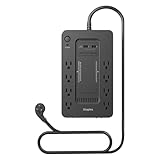
The Staples TECH 650VA UPS is the straightforward option: a mid-capacity unit with eight outlets, surge protection, and no feature list to decode. It sits in the 650 VA class, which puts it above the entry-level 425 VA units and below the 850 VA mid-range models, and it is priced accordingly. For a buyer who wants a recognized retail brand, a simple black tower, and enough backup to cover a router, a modem, and one small device, it is a reasonable answer.
Key specifications
- 650 VA class capacity
- 8 outlets split between battery-backed and surge-only groups
- Surge protection on all outlets
- Compact black tower chassis
- Outlet-only layout with no USB charging ports
- Price tier: budget
Where it makes sense. The 650 VA class is a genuinely useful middle ground that many buyers overlook. It has meaningfully more headroom than a 425 VA unit — enough to add a small NAS, a network switch, or a second router to the battery side without overloading — while staying in the budget tier. Eight outlets also means you are not forced to choose between protecting your network gear and plugging in the devices that just need surge protection. For a small home office where the priority is keeping the internet up and nothing more, this class is the sweet spot.
What to expect and what to verify. Because this unit is sold under a retail house brand, the specification sheet is thinner than what CyberPower and APC publish. Before buying, confirm the watt rating rather than relying on the VA figure, confirm how many of the eight outlets are actually battery-backed rather than surge-only, and confirm the battery type so you know what replacement will cost and how easy it will be to source. Those three details determine whether a budget 650 VA unit is a good deal or a disappointment, and they are the same three details worth checking on any house-brand UPS.
Pros
- 650 VA class offers more headroom than entry-level 425 VA units
- Eight outlets with surge protection across the bank
- Budget tier pricing
- Simple, unfussy design with nothing to configure
Cons
- Thinner published specifications than the major UPS brands
- No USB charging ports
- Battery replacement sourcing may be less convenient
- No LCD or detailed status reporting
How it compares. Against the CyberPower ST625U, the two are close in capacity class and price tier, but the ST625U publishes a clear 625 VA / 340 W rating, splits its outlets four and four with two USB charging ports, and comes from a brand with a long-established battery replacement path. That makes the ST625U the safer buy for most readers. The Staples unit’s case rests on availability and simplicity — if it is what is in front of you and the specifications check out, it will do the job. Against the CyberPower EC850LCD, it gives up AVR, an LCD, and roughly 200 VA of capacity, but it costs considerably less.
9. CyberPower ST625U – Best for Mid-Range Home Networking

The ST625U is the natural upgrade from a 425 VA budget unit without jumping into the premium tier. At 625 VA / 340 W it has enough capacity to carry a router, a modem, a switch, and a small NAS simultaneously, and it keeps the standby topology and compact footprint that make the smaller CyberPower units easy to live with.
Key specifications
- 625 VA / 340 W capacity
- Standby topology
- 8 outlets: 4 battery-backed with surge protection, 4 surge-only
- 2 USB charging ports
- Simulated sine wave output
- Compact chassis suitable for a shelf or the floor
- Price tier: mid-range
The case for stepping up. The difference between 260 watts and 340 watts sounds modest on paper, but it is the difference between a unit that can only carry networking gear and one that can also absorb a small NAS or a mini PC. A two-bay NAS typically draws 20 to 40 watts at idle and considerably more during spin-up, and the extra headroom means spin-up surges do not push the unit toward overload. The four battery-backed outlets cover router, modem, switch, and NAS exactly, with the four surge-only outlets free for everything else.
Tradeoffs of standby topology. Standby units do not regulate voltage continuously, so brownouts and sustained undervoltage reach your equipment unless they are severe enough to trigger a transfer to battery. For networking gear with switching power supplies, that is usually acceptable — these devices tolerate a wide input range and are rarely damaged by modest voltage sag. What you give up in regulation you gain in efficiency and heat, and for a unit that will run quietly on a shelf for years, that trade is defensible. If your area has chronic voltage problems rather than occasional outages, an AVR-equipped unit is the better choice regardless of capacity.
Pros
- 340 watts covers a full network stack plus a small NAS
- Two USB charging ports at the mid-range price
- Four battery-backed and four surge-only outlets
- Compact and quiet in operation
- Straightforward battery replacement in a common form factor
Cons
- No automatic voltage regulation
- Simulated sine wave output
- 340 watts still rules out desktop towers
- No LCD or detailed load reporting
How it compares. Against the APC BE600M1, the ST625U has slightly more capacity (340 W versus 330 W), one extra outlet, and one extra USB port, while the APC counters with five battery-backed outlets instead of four and a slightly more compact body. The choice comes down to whether you value outlet count or battery-backed outlet count. Against the CyberPower EC850LCD, the ST625U gives up 170 watts of capacity, AVR, and an LCD panel, but it costs less and stays in a smaller footprint. For a network shelf with no desktop on it, the ST625U is the better value of the two.
How to Choose
Start with watts, not VA
The single most common mistake in UPS buying is choosing by VA. The VA figure describes apparent power, which includes current that does no useful work; the watt figure describes real power, which is what actually runs your equipment. A UPS rated 1500 VA might be rated 1000 W or 900 W depending on its design, and that difference determines what you can plug in. Always find the watt rating before you buy, and treat it as the ceiling for your connected load.
To size a unit, add up the watt draw of everything you want on the battery side. Typical figures: a router draws 10 to 15 watts, a cable modem 8 to 12 watts, a fiber ONT 5 to 10 watts, a network switch 5 to 20 watts depending on port count, a two-bay NAS 25 to 45 watts at idle, a 24-inch monitor 20 to 30 watts, a 27-inch monitor 25 to 40 watts, a laptop dock 60 to 90 watts, and a desktop tower anywhere from 80 watts at idle to 500 watts or more under load. A router, modem, switch, and NAS together land around 60 to 90 watts. A desktop tower with two monitors can easily reach 300 watts.
Worked example. Suppose your setup is a router (12 W), a modem (10 W), a switch (15 W), and a two-bay NAS (35 W). Total draw is 72 watts. Divide by a typical power factor of 0.6 for a standby unit and you get 120 VA of apparent power — well inside a 425 VA unit. But sizing only to the draw is a mistake. A UPS should run at roughly 60 to 70 percent of its rated watt capacity at most, so the right target is a unit rated around 110 to 120 watts minimum, and in practice a 260 W unit gives you comfortable headroom. Now add a desktop tower at 250 W and two monitors at 60 W: the total is 382 watts, which requires a 1500 VA class unit and rules out everything below the premium tier.
Runtime math: what your load actually buys you
Runtime falls off non-linearly as load rises. Doubling the load more than halves the runtime, because the inverter is also less efficient at higher output. The table below gives planning estimates by capacity class; treat them as ranges, not promises, and check the manufacturer’s published runtime curve for the exact unit you are considering.
| Capacity class | ~50 W load | ~100 W load | ~200 W load | ~400 W load |
|---|---|---|---|---|
| 425-450 VA / ~255-260 W | 20-35 min | 8-14 min | 2-4 min | Not supported |
| 600-650 VA / ~330-390 W | 35-55 min | 14-22 min | 5-9 min | Not supported |
| 850 VA / ~510 W | 50-75 min | 22-32 min | 8-14 min | 3-5 min |
| 1500 VA / ~900-1000 W | 90-150 min | 45-70 min | 18-30 min | 7-12 min |
The practical takeaway is that a small unit on a light load outperforms a large unit on a heavy load in both runtime and efficiency. If your goal is “keep the internet up for an hour,” a 425 VA unit on a 30-watt network stack will beat a 1500 VA unit carrying a desktop. Buy capacity for the load you actually have, not for the load you imagine you might add later.
Waveform: sine wave versus simulated sine wave
Standby and most line-interactive UPS units output a stepped approximation of a sine wave, often called simulated or modified sine wave. For routers, modems, switches, NAS units, and older computers with conventional power supplies, this works fine. It becomes a problem with active PFC power supplies, which are now standard in quality desktop and server hardware. Symptoms range from audible buzzing from the power supply to the supply refusing to start on battery, and in the worst case to a failed transfer that drops the machine.
If your equipment uses an active PFC supply — and if it was built in the last decade and is not a budget unit, it probably does — a pure sine wave UPS is the correct choice. In this roundup that means the CyberPower CP1500PFCLCD. If you are protecting only networking gear, monitors, and laptops, simulated sine wave is fine and you can save the money.
Outlet types, counts, and spacing
Outlet count is the least useful specification on a UPS box, because it usually includes surge-only receptacles that do nothing during an outage. What matters is the split. A unit with twelve outlets and four battery-backed is less useful for a network stack than one with eight outlets and six battery-backed. Look for the ratio, and count how many devices genuinely need to stay running.
Spacing matters more than most buyers expect. Large power adapters, angled plugs, and wall warts can block adjacent receptacles on a tightly packed strip. Units with widely spaced outlets, like the APC BX1500M, solve this at the cost of a larger chassis. If your devices use transformer blocks, check spacing before you commit.
One rule worth stating plainly: never plug a UPS into a surge protector, and never plug a surge protector into a UPS. Daisy-chaining protection devices can defeat the surge circuitry and, in some cases, void warranties. Plug the UPS directly into a wall receptacle.
What not to plug in
Laser printers draw enormous surge current when they heat up and can overload a UPS instantly; put them on the surge-only side or on a separate strip. Space heaters, vacuums, and power tools should never touch a UPS. Devices with large motors, including some fans and compressors, are also poor candidates. Keep the battery side for electronics with steady, modest draws.
Battery replacement and cost of ownership
The battery is the part that wears out. Sealed lead-acid packs in these units typically last three to five years, and their life shortens significantly in warm environments — a UPS in a closed cabinet at 30°C may need a new battery in two years. Signs that replacement is due include runtime that has dropped noticeably, a self-test that fails, and a battery indicator that never reaches full.
Replacement packs for CyberPower and APC units are widely available and inexpensive relative to the cost of the unit, which is a strong argument for buying from a brand with a long replacement path. Budget house-brand units can be harder to source for, and if you cannot find a pack, the whole unit becomes disposable. Over a ten-year life, expect to replace the battery two or three times. Factor that into your comparison: a slightly more expensive unit with an easy replacement path is often cheaper to own than a bargain unit you throw away.
Form factor and placement
Small units under 650 VA generally sit on a desk, on a shelf, or behind furniture. Mid-range units in the 850 VA class can go either way. Units at 1500 VA are floor devices: they are heavy, they generate heat under load, and they need airflow. Do not enclose a UPS in a sealed cabinet, and do not stack equipment directly on top of the vents. Also decide early whether you want front-facing outlets for chargers or rear-facing outlets for permanent connections; the two layouts suit different desks.
Matching the situation to the unit
| Your situation | Recommended approach | Why |
|---|---|---|
| Router and modem only, tight budget | 425 VA standby class (CyberPower ST425, APC BE425M) | Low draw, long runtime, lowest cost |
| Router, modem, switch, and a small NAS | 600-650 VA class (APC BE600M1, CyberPower ST625U) | Enough headroom for NAS spin-up; graceful shutdown possible |
| Home office with chronic brownouts | AVR-equipped mid-range (CyberPower EC850LCD) | Voltage regulation without draining the battery |
| Mid-range desktop plus one monitor | 850 VA / 510 W class | Covers tower and display with room to save and shut down |
| Modern desktop with active PFC supply | 1500 VA pure sine wave (CyberPower CP1500PFCLCD) | Waveform compatibility prevents transfer failures |
| Multi-monitor laptop desk with a dock | 1500 VA with many battery outlets (CyberPower CP1500AVRLCD3) | Six battery-backed outlets and load reporting |
| High-wattage older desktop, tight budget | 1500 VA with AVR (APC BX1500M) | 900 W and wide outlet spacing at lower cost than sine wave |
| One device, minimal space | Smallest available chassis (APC BE425M) | Fits inside a media cabinet where larger units will not |
Features worth paying for, and features that are not
Automatic voltage regulation is worth paying for if your area has unstable voltage; it corrects sags and swells continuously and is used far more often than the battery itself. A pure sine wave output is worth paying for if any connected device has an active PFC power supply. USB charging ports are a genuine convenience and cost very little. An LCD panel is useful for load planning but not essential. Software that triggers an automatic shutdown is valuable if you run a NAS or a server, and both CyberPower and APC provide it for their line-interactive models — check that the specific unit supports it before buying, because budget standby models often do not.
Frequently Asked Questions
How many watts do I need for a desktop PC and monitor?
Add the tower’s actual draw to the monitor’s draw, then leave headroom. A typical office tower idles around 80 to 120 watts and peaks far higher under load, while a 27-inch monitor draws 25 to 40 watts. For a mid-range desktop with one monitor, a 850 VA / 510 W unit is usually sufficient. For a gaming or workstation-class machine, plan on a 1500 VA unit rated at 900 W or more.
Will a simulated sine wave UPS damage my computer?
It will not usually damage it, but it can fail to run it. Modern power supplies with active power factor correction can buzz, refuse to start on battery, or cause the UPS to misread the load when fed a stepped waveform. If your computer was built in the last decade with a quality power supply, a pure sine wave UPS is the safer choice.
How long will a UPS keep my router and modem running?
A router and modem together draw roughly 20 to 30 watts, and a 425 VA unit in that range typically provides enough runtime to cover brief outages and utility switching events. Larger units will run the same load considerably longer. Exact figures depend on the specific model and the age of its battery, so check the manufacturer’s runtime chart for the unit you are considering.
When should I replace the UPS battery?
Sealed lead-acid batteries in these units generally last three to five years, and shorter in warm locations. Replace when runtime has dropped noticeably, when a self-test fails, or when the battery indicator never shows a full charge. Replacing the pack is far cheaper than replacing the unit, provided the manufacturer still supplies a compatible battery.
Can I plug a laser printer into a UPS?
Not on the battery-backed outlets. Laser printers draw a large surge of current when the fuser heats, which can overload a consumer UPS immediately. Put the printer on a surge-only outlet or on a separate power strip. The same applies to space heaters, vacuums, and any device with a large motor.
Do I still need a UPS if I already have a surge protector?
Yes, because they solve different problems. A surge protector shunts excess voltage to ground during a spike but provides no power during an outage. A UPS provides both surge protection and battery backup. Many UPS units include surge protection on all outlets, so they can replace a basic strip rather than supplement it.
What is the difference between VA and watts on a UPS label?
VA measures apparent power and watts measure real power, and the ratio between them is the power factor. A UPS rated 1500 VA might be rated 1000 W or 900 W. The watt rating is the one that determines what the unit can actually run, so compare watt figures when sizing a UPS rather than VA figures.
Can I plug a power strip or extension cord into a UPS?
Short extension cords are generally acceptable if they are heavy-gauge and undamaged, but never plug a surge protector into a UPS or a UPS into a surge protector. Daisy-chaining surge devices can defeat their protection circuitry and may void the warranty. Plug the UPS directly into a wall receptacle and connect devices directly to the UPS where possible.
The Short Version
If you are protecting a router, a modem, and nothing else, buy the smallest unit that fits your space — the CyberPower ST425 if you want USB charging and eight outlets, or the APC BE425M if you need the smallest possible chassis. If you are adding a small NAS or a switch to that network shelf, step up to the APC BE600M1 or the CyberPower ST625U; the extra 70 to 80 watts of headroom is what lets a storage array spin up and shut down cleanly. If your area has unstable voltage rather than occasional outages, the CyberPower EC