
Our Top Picks
 Klein Tools 935DAG Digital Electronic Level and AngleLevel2.36 x 2.2 x 1.2 Inches0.2 poundsCheck on Amazon


What's inside
As an Amazon Associate I earn from qualifying purchases. This post may contain affiliate links at no extra cost to you.
Every woodworker has cut a miter that looked right on the saw’s scale and came out a hair off at the corner. The built-in detents and printed bevel scales on table saws and miter saws are fine for rough work, but a digital angle gauge turns “close enough” into a number you can read, zero against the table and repeat. For joinery, picture frames, crown and cabinet carcases, that number is the difference between a tight seam and a shim.
This roundup is for hobbyists and small-shop builders deciding which of eight digital angle gauges suits setting blade tilt, checking fence squareness and reading slopes. It is editorial, drawn from the published listings for 2026, so it focuses on what the titles state: measuring range, magnetic bases, alerts, lasers and unit conversion. It does not claim lab verification of accuracy.
Contents
Quick Picks
As an Amazon Associate we earn from qualifying purchases at no extra cost to you.



| Product | Best for | Key feature from the listing |
|---|---|---|
| Klein Tools 935DAG | General shop and layout use | 0-90 and 0-180 degree ranges, measures and sets angles |
| GemRed DAG-V1 | Simple measuring and layout | Digital angle gauge aimed at layout work |
| Klein Tools 935DAA | Setting a target angle | LED alert, 0-90 and 0-180 degree ranges |
| SAVSEC Digital Angle Finder | Table saw blade tilt | Magnetic, rechargeable, +/-0.1 degree, LCD screen |
| BOBOVAV 3-in-1 | Layout plus hanging tasks | Three laser modes, two-sided magnet, absolute and relative modes |
| Wixey Digital Angle Gauge | Table saw and miter saw setup | Magnetic base, easy-read display |
| Klein Tools 935DGGP | Slopes and conversions | Strong magnetic base, degrees, percent grade, in/ft, mm/m |
| COROLLATA Dual Laser Cube | Four-side magnetic reference | Dual laser, four magnetic sides, digital level cube |
How to Choose
A magnetic base matters more than a screen size
Most shop use means sticking the gauge to a cast iron table or a saw blade body. Look for a flat, strong magnetic face, and check whether it magnetizes on more than one side so it can sit on a fence or a blade plate. A gauge that will not stay put makes every reading a two-handed job, and a weak magnet can slip off a tilted blade right as you read the number. Rubberized or flat-faced bases also protect a polished saw table from scratches.
Range and modes you will actually use
A 0-90 range covers blade tilt and fence squareness. A 0-180 range adds general layout and tapers. Absolute mode reads against gravity, while a relative or zero function lets you set a reference on the table and read the difference, which is the method for tilting a blade. Check that the listing mentions a zero or relative mode, because without it you must do arithmetic against whatever angle the table happens to sit at.
Resolution and honest accuracy
A stated +/-0.1 degree figure is useful for comparing, but confirm the claim by checking the gauge against a known square before trusting a setup. Ignore lasers and beepers unless you need them for hanging or alignment tasks; they add convenience, not woodworking precision. A readable display under shop lighting, ideally with a backlight, matters more than extra screen size.
Where budget models cut corners
Cheaper gauges often have fewer calibration controls, thinner battery doors and weaker magnets. Rechargeable units save on coin cells but need a charging habit. A gauge with a clean zero button and a data hold feature will save more frustration than extra gimmicks. Also look at the size: a thick body will not slip between a blade and a throat plate.
The 8 Best Options
Klein Tools 935DAG
A dependable all-around choice for woodworkers who also handle general trades layout and like a recognized tool name on the bench. It measures and sets angles across two ranges, which makes it flexible for both shop setup and odd jobs around the house.
- 0-90 and 0-180 degree ranges
- Measures and sets angles, handy for repeating a stored target
- Trade-off: the listing highlights no specialty woodworking mount, so confirm the base grips your saw
Skip it if you want a laser or alert built into the unit.
GemRed DAG-V1
A basic digital gauge for measuring and layout when you want a plain reading without paying for alerts or lasers. It fits a hobbyist who mostly checks squareness and fence angles and does not mind a simple tool.
- Digital readout intended for measuring and layout
- Simple concept suited to square-and-bevel checks
- Trade-off: the listing offers little detail on range, base or stated accuracy
Skip it if you need documented specifications before buying.
Klein Tools 935DAA
Meant for people who set a target angle again and again and like a signal when they reach it, such as a builder tilting a saw blade to a standard bevel. The alert reduces the back-and-forth of watching the display while adjusting a crank.
- LED alert signals the set angle
- 0-90 and 0-180 degree ranges
- Trade-off: the alert adds convenience rather than extra precision
Skip it if you only need a basic readout.
SAVSEC Digital Angle Finder
Targeted at table saw blade setup and general woodworking, with a rechargeable battery and a magnetic back that clings to a blade or cast iron. The title also mentions pipe bending, so it doubles as a general inclinometer.
- Stated +/-0.1 degree accuracy over a 0-90 range
- Magnetic and rechargeable, with an LCD screen
- Trade-off: the 0-90 range is narrower than 180-degree gauges
Skip it if you need wide-range layout or unit conversion.
BOBOVAV 3-in-1
A multifunction gauge for builders who mix shop setup with hanging or alignment tasks, packing lasers, magnets and several measurement modes into one rechargeable body. It rewards someone who likes having options at hand.
- Three laser modes and a two-sided magnet
- Four units, absolute and relative modes, data hold and audio and visual alerts
- Trade-off: the many features can clutter a tool meant for a simple blade check
Skip it if you prefer minimal controls.
Wixey Digital Angle Gauge
Written for table saw and miter saw setup, which makes it the closest to a single-purpose woodworking gauge in this group. The easy-read display points toward quick glances while you adjust a blade.
- Magnetic base for sticking to blades and tables
- Easy-read display aimed at fast checks
- Trade-off: the listing mentions no laser, alert or unit conversion
Skip it if you want extra modes or lasers.
Klein Tools 935DGGP
For woodworkers who also work with slopes, such as ramps, stair stringers and roof pitch, because it converts between several measurement styles. The strong magnetic base also suits steel surfaces around a shop.
- Strong magnetic base
- Converts between degrees, percent grade, in/ft and mm/m
- Trade-off: the conversion features suit builders more than pure furniture makers
Skip it if you only measure blade tilt.
COROLLATA Dual Laser Cube
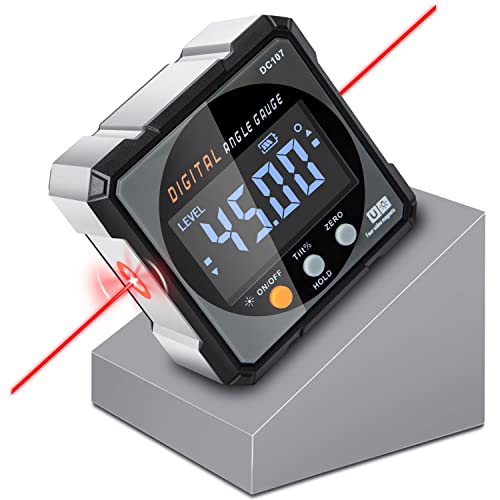
A cube-shaped tool for people who want magnets on several faces and a laser line for alignment around the shop, such as leveling a bench or lining up a long assembly. It reads like a hybrid of a gauge and a layout aid.
- Four strong magnetic sides
- Dual laser inclinometer in a digital level cube design
- Trade-off: the cube is bulkier than a slim gauge in a saw throat
Skip it if you need a thin profile for tight spots.
Whichever gauge you pick, the habit matters as much as the hardware. Check it against a trusted square when it arrives, keep a spare battery or charging cable near the saw and store it away from sawdust and impacts. A gauge dropped on a concrete floor can lose its calibration even when the screen still lights up.
Which One Fits Your Situation
You set blade tilt on a table saw weekly
The Wixey Digital Angle Gauge and SAVSEC Digital Angle Finder are the most directly aimed at saw setup, with magnetic backs and readable screens. Either one lets you zero on the table, clip to the blade and tilt until the display matches your target, with no trial cut required.
You need to hit the same angle repeatedly
The Klein Tools 935DAA adds an LED alert and a set function, so repeating a standard bevel becomes quicker. Cabinet and frame builders who return to 45 degrees or 22.5 degrees all day will notice the saved motion.
You work on slopes as well as joinery
The Klein Tools 935DGGP converts to percent grade and rise-over-run, which suits ramps, shelves and outdoor builds. Pair it with a good square for the furniture side of the shop. The BOBOVAV 3-in-1 and COROLLATA Dual Laser Cube are the options for builders who also hang shelves or align long assemblies.
Common Mistakes
- Zeroing the gauge on a surface that is not flat, then trusting the offset.
- Relying on a laser feature for woodworking precision.
- Skipping a square check to confirm the gauge reads true.
- Buying a wide-range model when only a 0-90 reading is needed.
- Ignoring battery type and discovering it is dead mid-job, then reaching for a spare that does not exist.
Related guides
- Plunge Router Vs Fixed Base Router: Which To Buy First
- Random Orbital Sander For Furniture Refinishing
- Why Loose Tenon Joinery Is Taking Off In Small Shops
Frequently Asked Questions
Do I need a digital gauge if the saw already has a bevel scale?
Printed scales drift and wear. A digital gauge lets you confirm the real blade angle without making a trial cut.
How should I zero it?
Place the gauge on a known flat reference such as the saw table, press zero, then attach it to the blade or fence and read the difference. Clean the magnet face first; a chip of sawdust can add a fraction of a degree.
Are lasers useful for woodworking?
Mainly for alignment and hanging tasks. They do not improve the angle reading itself, so choose them for convenience rather than accuracy.
Is a rechargeable model better?
It avoids coin cells but needs charging. Choose by whether you prefer swapping batteries or topping up. Either way, keep it accessible so you actually use it before each critical cut.
Related guides
More from Amazon
Programs that pair well with the guide above. Offers and eligibility are set by Amazon and may change.
A free business account with business pricing and bulk-buying tools for work, shop or home office.
Create a business accountFree shipping on eligible items, Prime Video and more. Eligible new members can start with a free trial.
Start a Prime free trialAudiobooks and podcasts to listen to on the go. Eligible new members can start with a free trial.
Try Audible freeAd-free music streaming. Eligible new subscribers can start with a free trial.
Try Music Unlimited freeAs an Amazon Associate we earn from qualifying purchases.




Write Your Review
No reviews yet. Be the first to share your experience!